Skill Management
A Skill is a pluggable capability unit of Super Agent. Administrators can centrally manage organization-level Skills on the platform to provide reusable capability modules for Super Agent.
When a user request involves a specific format, fixed workflow, or domain convention, Super Agent will prioritize routing to the corresponding Skill instead of temporarily organizing rules.
Skill Types
Skills are divided into two categories:
- Prompt-based Skill: contains only
SKILL.md, without execution scripts; essentially a structured system prompt. - Execution-based Skill: in addition to
SKILL.md, also includes execution metadata such asscripts/,manifest.json, andskill.runtime.json.
Management Entry and List View
- Go to the skill management page: navigate to Organization Studio -> Skills Management.
- The system displays the name and description of all uploaded skills in card form.
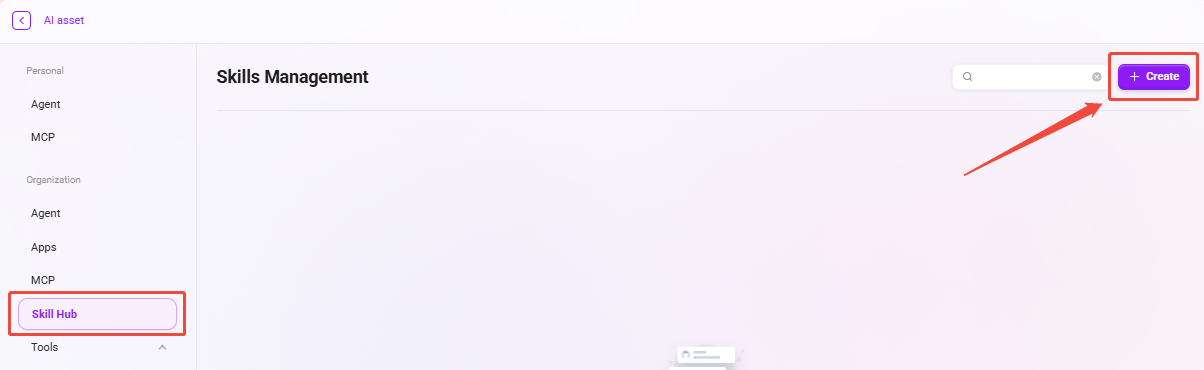
Common skill package examples:
pdf: read, parse, or process PDF files.xlsx: read and write spreadsheets and process structured data.slides-json-generator: generate JSON data required for PPT/slides.Chart Generator: generate charts (bar charts, line charts, pie charts, etc.) based on input data.
Add Skill Package
Skill management supports uploading skill packages from local files to extend organizational capabilities.
- On the skill management page, click Create.
- Select a local file or drag and drop to upload directly.
- After the upload is complete, return to the skill list to confirm the import was successful.
Tip: After a skill is uploaded, it must also be associated in the Super Agent management configuration before it can be automatically recognized and invoked at runtime.
Upload Limits
- Number of skill packages per upload: 1
- Supported skill package formats:
.zip/.skill/.md - Skill package size limit: 50 MB
Skill Configuration
After importing a skill, you can adjust the configuration according to business needs.
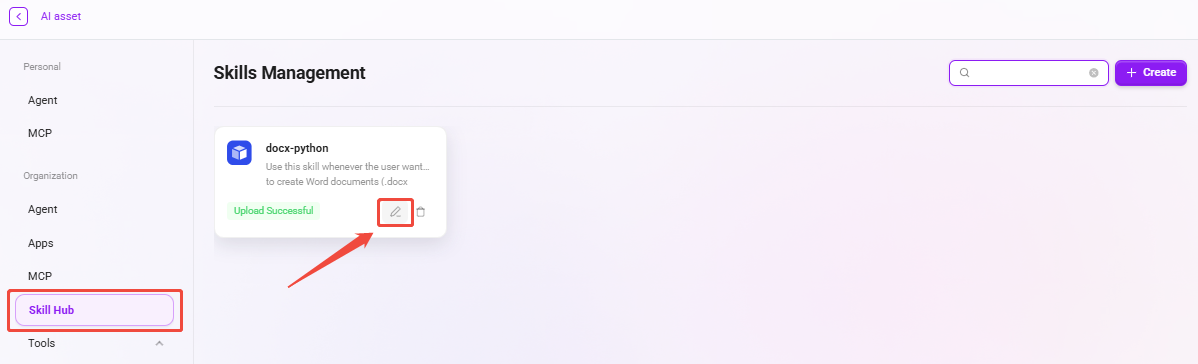
- Select the target skill from the skill list.
- Click ✏️ to enter the settings page, where you can re-upload the skill package.
Platform Runtime Capabilities and Boundaries
Automatically Handled by the Platform
- Environment variable injection (
SKILL_DIR,SKILL_OUTPUT_DIR, etc.) - Bare filename resolution (prefers
workspace/, then historicalruns/) - Known path parameter rewriting (from
skill.runtime.json) - Working directory switching (
skill/workspace/output) - Automatic artifact detection based on
output_patternsandmanifest
What the Platform Cannot Safely Infer
- Which positional arguments are file paths (when the Skill does not declare
path_args) - Whether a third-party CLI returns misleading exit codes
- Whether the script should read from
workspace, the previous run directory, or resources inside the Skill package - Which generated files are final deliverables (when
output_patternsormanifest outputsare not declared)
Security Boundaries
- Must run in the platform sandbox; do not assume the script runs on the business host machine.
- Skill self-service dependency installation is not supported; it does not rely on
requirements.txt/package.json. - For additional dependencies, contact the platform for preinstallation.
The script execution methods are as follows:
| Language | Execution Method | Requirement |
|---|---|---|
.py | The platform loads and executes via runpy.run_path() | No special requirements |
.sh / .bash / .js and other languages | Run directly as an executable file (subprocess.run([script])) | Must have a shebang (such as #!/usr/bin/env bash) and executable permission |
Note: The platform does not automatically select an interpreter based on the file extension. If a non-Python script lacks a shebang or executable permission, it will fail to run directly. It is recommended to use a Python script as the entry point and let it invoke other languages.
Relationship with Other Platform Capabilities
- Based on the current Skill positioning and security model, direct access to the platform database and platform APIs through Skill is not supported.
- When accessing external service interfaces, MCP access is recommended first.
- Skill focuses more on orchestration of “whether to invoke” and “when to invoke,” and does not replace MCP’s authentication management and access constraints.
- If it is necessary to guide Super Agent to send
curlrequests through Skill, an access allowlist must be configured in the sandbox.
Sandbox Preinstalled Dependencies
The Universal Sandbox image has some dependencies preinstalled. Skill scripts can directly use them via import / require without additional installation.
Image source files:
serviceme-sandbox/docker/images/universal-sandbox/