Data Catalog
Synchronize Data Tables and Views
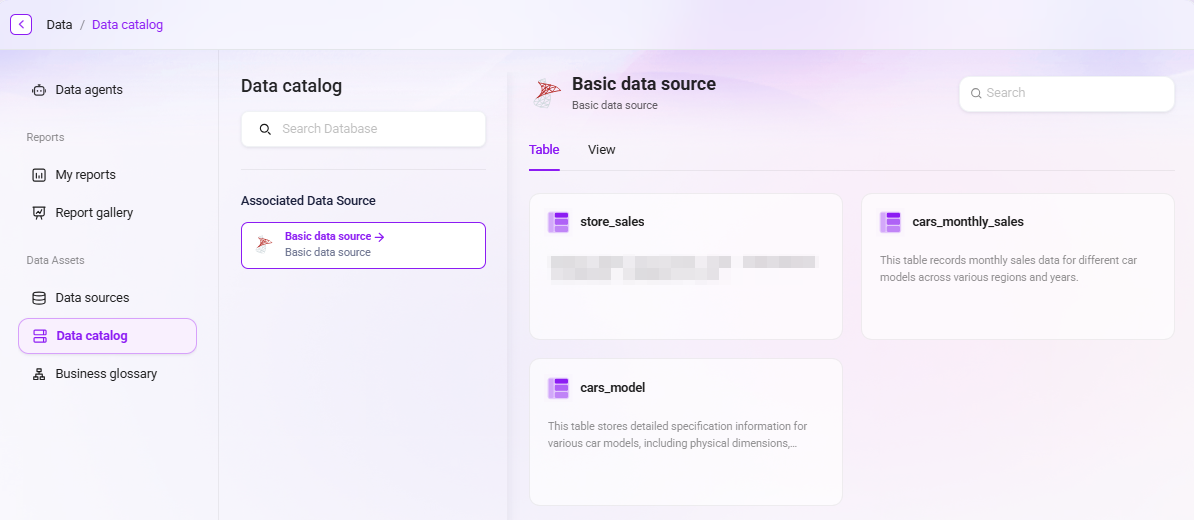
After connecting a data source, users can view and manage synchronized tables in the "Data Catalog" module.
- Only checked tables in the data source are displayed;
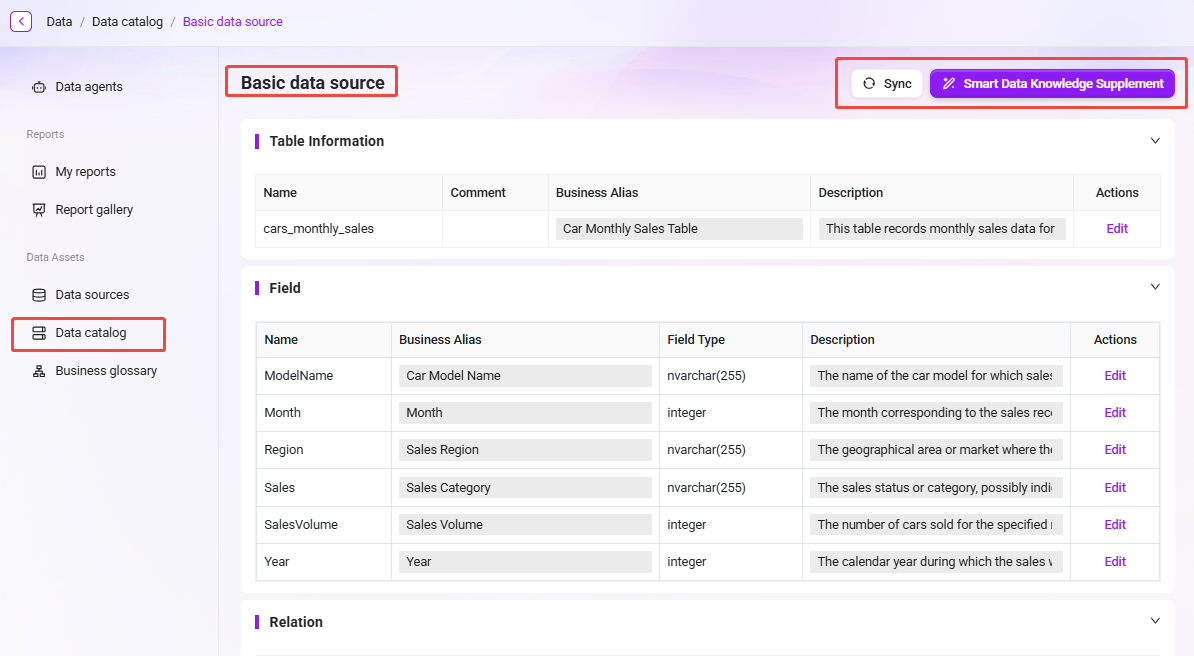
- Supports viewing each table’s table name, business description, field names, and field descriptions;
- Displays the relationships between the table and other tables, including related tables, related fields, and relationship types (such as primary-foreign keys);
- Supports one-click triggering of "Intelligent Data Knowledge Enrichment", where the system automatically generates business aliases and descriptions for tables and fields based on AI and Schema;
- Supports the "Data Table Synchronization" feature, which can reload updated table structures.
Notes on Data Catalog Synchronization
-
Unsynchronized tables or views cannot be used
- Only tables and views that have been synchronized in the data catalog can be referenced in the Data module of SERVICEME or used to build business domains.
- If new data exists in the database but has not been synchronized in the data catalog, the system will not be able to recognize or use it.
-
Database structure updates require re-synchronization
- When the table structure or field information in the external database changes (for example, new fields are added, field types are adjusted, tables are renamed, etc.),
- users need to perform the "Synchronize" operation in the data catalog to ensure that the data structure remains consistent with the source system.
- Otherwise, the data in SERVICEME will still run based on the old version structure, which may cause subsequent data mapping errors or missing fields.
-
Common causes of synchronization failure and troubleshooting
- Data source connection failure: This may be caused by changes to the data source password, database service interruption, or network issues. Please retest the connection in "Data Source Management".
- Insufficient table permissions: Some database accounts may only have read-only permissions or lack metadata access permissions. Please contact the database administrator to grant the corresponding permissions.
- Special characters in field names or table names: In some databases, field names or table names may contain spaces, symbols, or reserved words. It is recommended to rename them in the database or exclude them before synchronization.
- Schema mismatch: When the database structure changes frequently or multiple Schema are used, it is recommended to confirm that the Schema configuration is correct before synchronization.
tip
- It is recommended that Data administrators regularly check the synchronization status of the data catalog, especially in scenarios where the database is updated frequently or business table structures change often.
- By keeping the data catalog up to date, you can ensure that AI Agent, BI reports, and intelligent analysis modules continuously receive accurate and usable data support.