Super Agent
Product Overview
Super Agent is a core feature of version 4.2, designed to aggregate multiple previously scattered Agent capabilities within the platform into a unified conversational entry point, forming a continuously collaborative task execution flow. While preserving context and conversation memory, users can seamlessly switch between different specialized Agents within the same session, avoiding repeated navigation across modules, re-uploading materials, or restating background information.
As a unified platform-level entry point, Super Agent transforms originally parallel and scattered Agent capabilities into a continuously collaborative task flow, intuitively demonstrating the product competitiveness of multi-Agent collaboration.
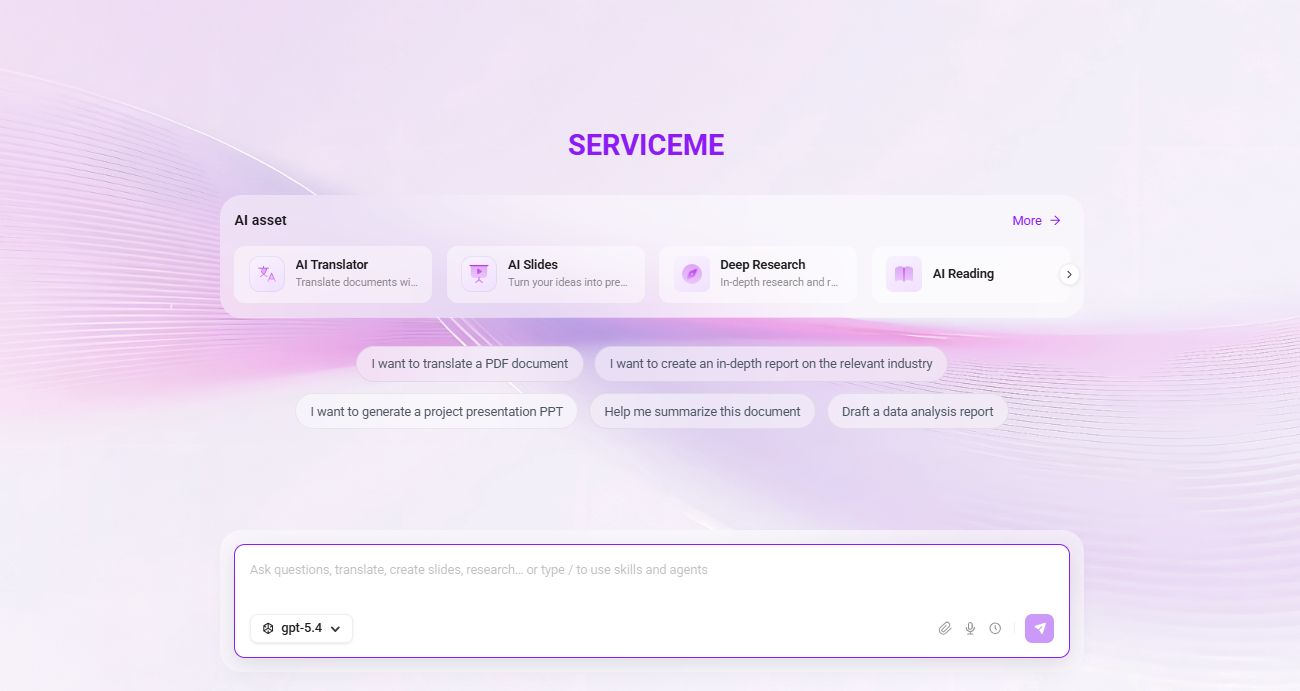
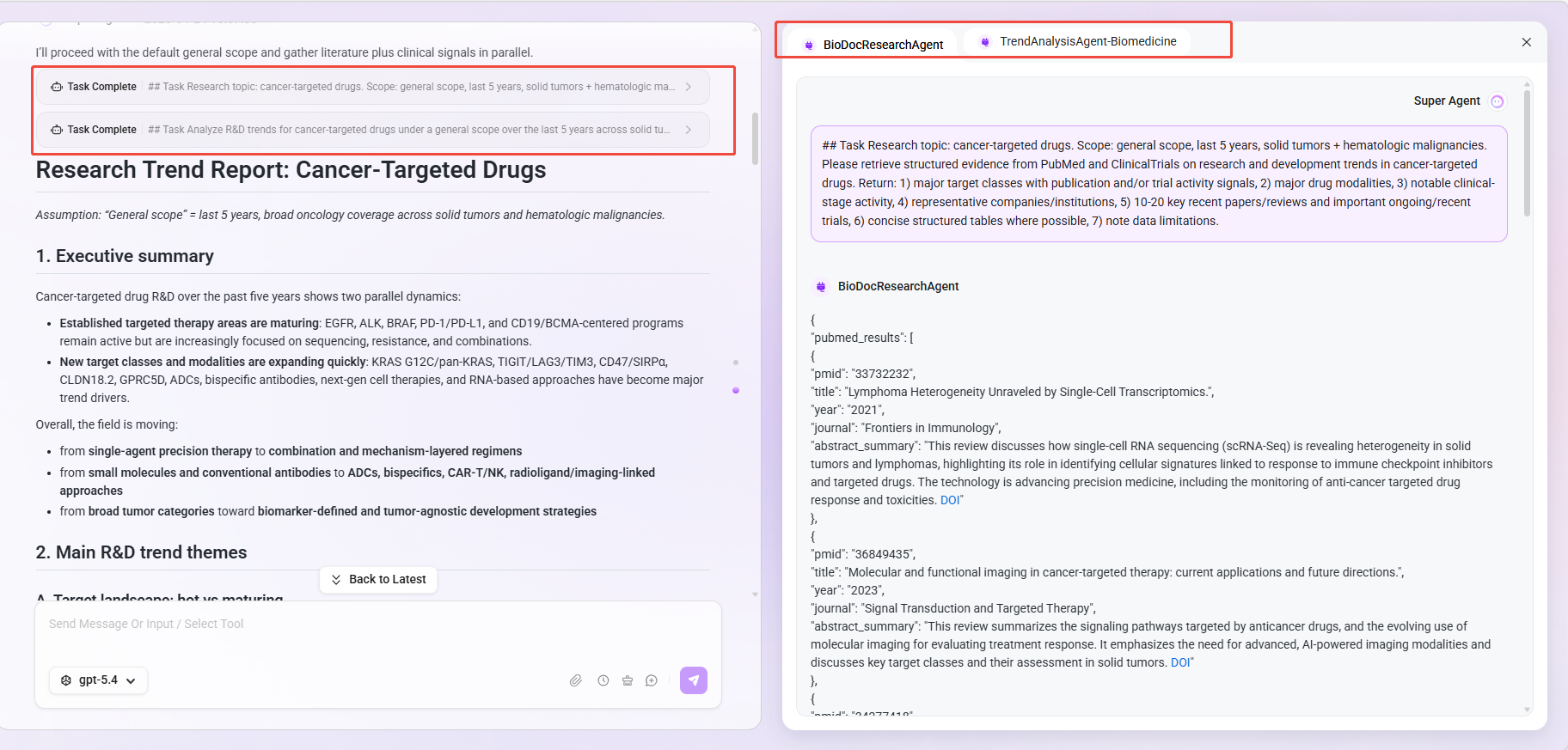
Super Agent page:
Typical Application Scenarios
- Multi-stage tasks centered around the same business topic, requiring sequential completion of information gathering, multilingual processing, content organization, and document writing.
- Users unfamiliar with platform functions who expect to complete work in a “describe the requirement first, then recommend an execution plan” manner.
- Teams that want to centrally manage multiple commonly used AI capabilities through a single entry point to improve overall efficiency and management visibility.
Core Value
- Stronger continuity: Supports continuously advancing multi-stage tasks such as research, translation, organization, and writing around the same topic, with naturally connected context.
- Lower learning cost: Users prioritize expressing task intent, and the system intelligently matches the most suitable Agent without requiring prior familiarity with the platform’s functional structure.
- Higher execution efficiency: Consolidates high-frequency AI tools into a single entry point, reducing tool switching and repeated input overhead.
- Greater collaboration value: Orchestrates parallel and scattered capabilities into connected and reusable task flows, adapting to team collaboration scenarios.
Functional Architecture
Intelligent Planning and Execution Engine
- Uses the Thought → Action → Observation autonomous loop mechanism to support multi-step reasoning and task decomposition.
- Automatically identifies problem types: for professional domain tasks, it intelligently calls the corresponding specialized Agent and provides clear prompts.
Built-in Tools
- Online search: Connects to search engines to obtain real-time external information.
- Mind map: Quickly generates structured mind maps to assist with idea organization.
- Plain text file operations: Supports reading, writing, and formatting of text files.
- Web-fetch: Fetches and parses webpage content from a specified URL.
Skills
Skills are the core scheduling mechanism of Super Agent. All skills run in a secure sandbox environment, and the execution process is traceable.
- Chart generation: Supports generating charts in formats such as Mermaid, with in-session preview and download available.
- Document processing: Supports generation, parsing, and information extraction for formats such as PDF, DOC, and XLSX.
- Multi-search-engine: Aggregates results from multiple search engines to improve information coverage and reliability.
Platform Runtime Integration
- MCP integration: Calls registered platform MCP Servers to extend external service connectivity.
- Agent scheduling: Automatically calls configured specialized Agents within the platform based on task type.
File and Knowledge Interaction
- File upload: Supports uploading files in multiple formats. After upload, content is read directly through the full-text reading tool and provided to the LLM by default, without going through the traditional RAG chunking process.
- Knowledge base files: Supports selecting and using indexed files from the knowledge base.
Input and Session Management
- Input methods: Supports text input and voice input.
- Model switching: Users can manually select the LLM model (the available range is configured by the admin side).
- Historical sessions: Supports viewing, continuing, and reusing historical session records.
- Memory compression: Built-in rolling compression mechanism ensures context stability in long-chain tasks.
Using Super Agent
Prerequisites
Administrator:
- Configure the model (recommended model: gpt-5.4)
- Connect the sandbox environment
- Configure OCR environment variables
- Configure online search and text-to-image tools (optional)
- Configure the Agents, MCPs, and tools to be called in the admin console and associate them with Super Agent
User:
- Have access permission to the Super Agent APP
The Agents, MCPs, and tools to be called must all be configured in the admin console and associated with Super Agent before they can be automatically matched and invoked at runtime.
Usage Boundaries
-
Models
- Applicable models: gpt-5.4, DeepSeek V3, and other non-reasoning models
-
Document upload
- File upload methods: supports knowledge base documents / uploading local documents
- Uploadable file formats: .ppt,.pptx,.doc,.docx,.xls,.xlsx,.csv,.md,.txt,.png,.jpeg,.jpg,.pdf
- Single file size limit: 100MB
- Maximum characters for single full-text parsing: 30000 characters by default
- Number of uploaded files: up to 3 by default
- Preview-supported formats for generated files: images (.png,.jpg,.gif,.webp,.svg,.bmp), .pdf, .xlsx, .md, .json, .xml, .txt, .log
-
Conversation input limits
- Single input content in the chat box: maximum 10000 characters
-
Binding Agents
- Only agents with MCP Server enabled can be bound to Super Agent as a sub-agent, and currently only text parameters can be passed; multimodal parameters such as images and files cannot be passed
Open Super Agent
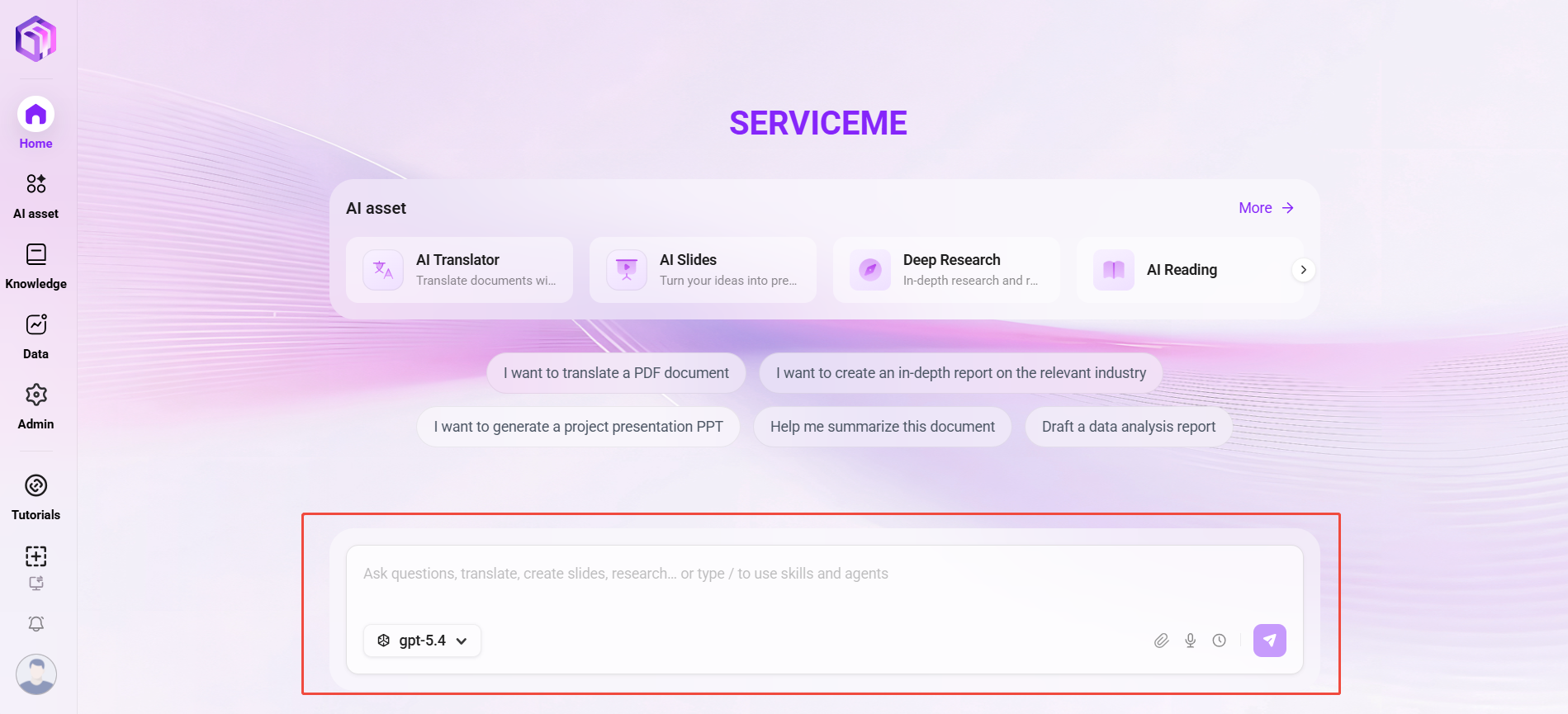
The entry point of Super Agent is the intelligent conversation area on the platform homepage. Enter a question in the homepage input box to interact with Super Agent.
- Input box: Users can directly enter questions, instructions, or text for natural language interaction.
- Files and knowledge base: Click the “
 ” icon at the lower right of the input box to upload local files or select files already uploaded to the knowledge base, and ask questions about document content.
 - Model selection: Supports selecting the model used for the current query through a dropdown (e.g., gpt-5.4, DeepSeek V3), flexibly adapting to different interaction scenarios and needs.
- History: Click the “
 ” icon to view and search past Q&A records.
 - Send button: Click the paper airplane icon in the lower right corner to submit the entered message or instruction and trigger the system response.
Skill Scheduling Mechanism
Super Agent intelligently handles user questions through preset “skills.” Skills are equivalent to the operating guide for Super Agent, defining which Agent, MCP service, or built-in tool should be called to respond when encountering specific types of questions.
Operation Process
- Enter the task: Enter the target task and expected output in the input box.
- Confirm the plan: Based on preset skills, the system automatically identifies intent, matches and calls the corresponding Agent, MCP, or tool for processing. You can view in real time the Agent, MCP, or tool called in the current step, as well as the results it uses.
- Multi-step execution: The system automatically advances according to the task flow, and users can add requirements, adjust output format, or switch Agents at any time within the same session.
- Result retention: Sessions and memory are automatically saved for subsequent reuse, traceability, and auditing.
Management Configuration
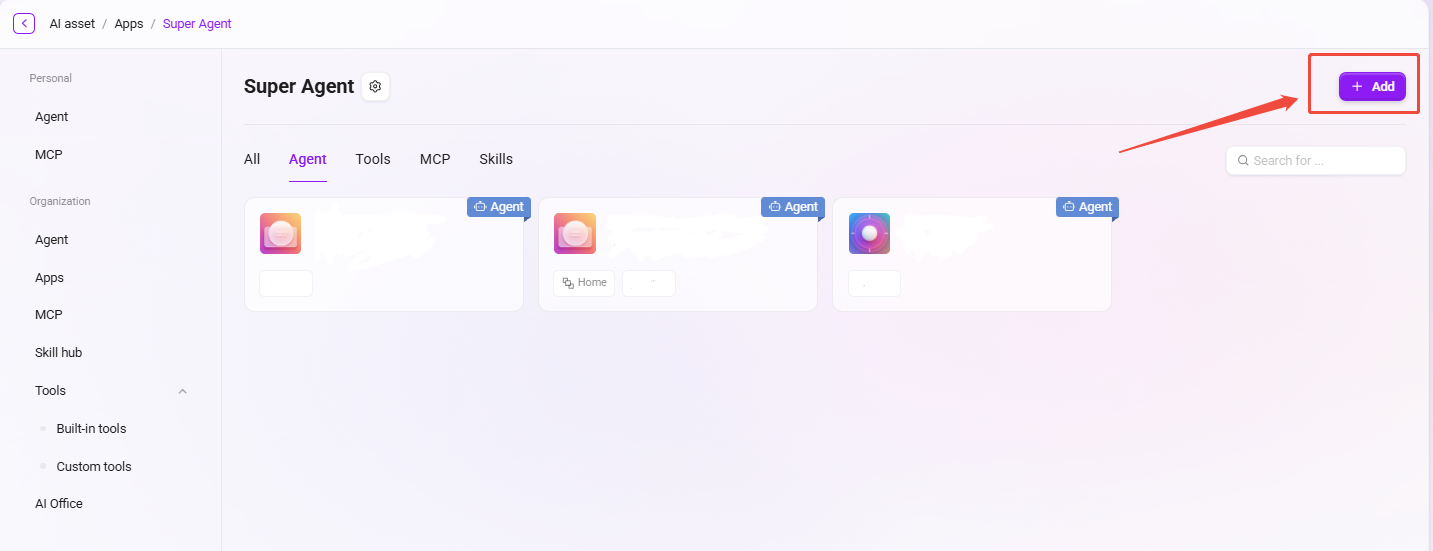
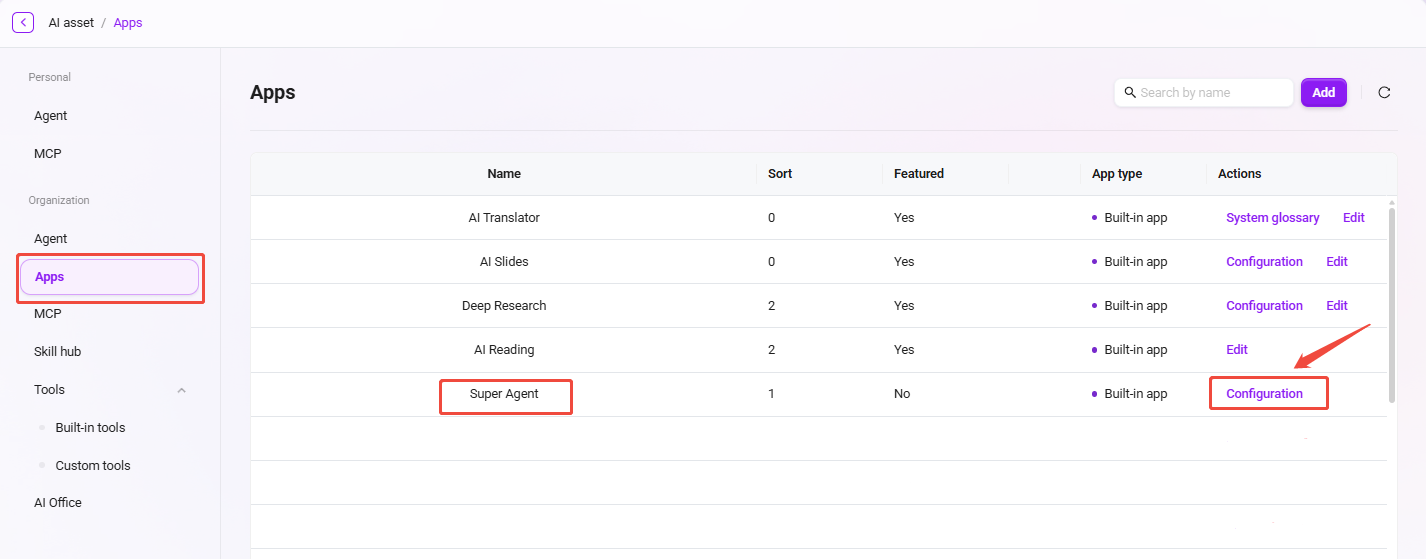
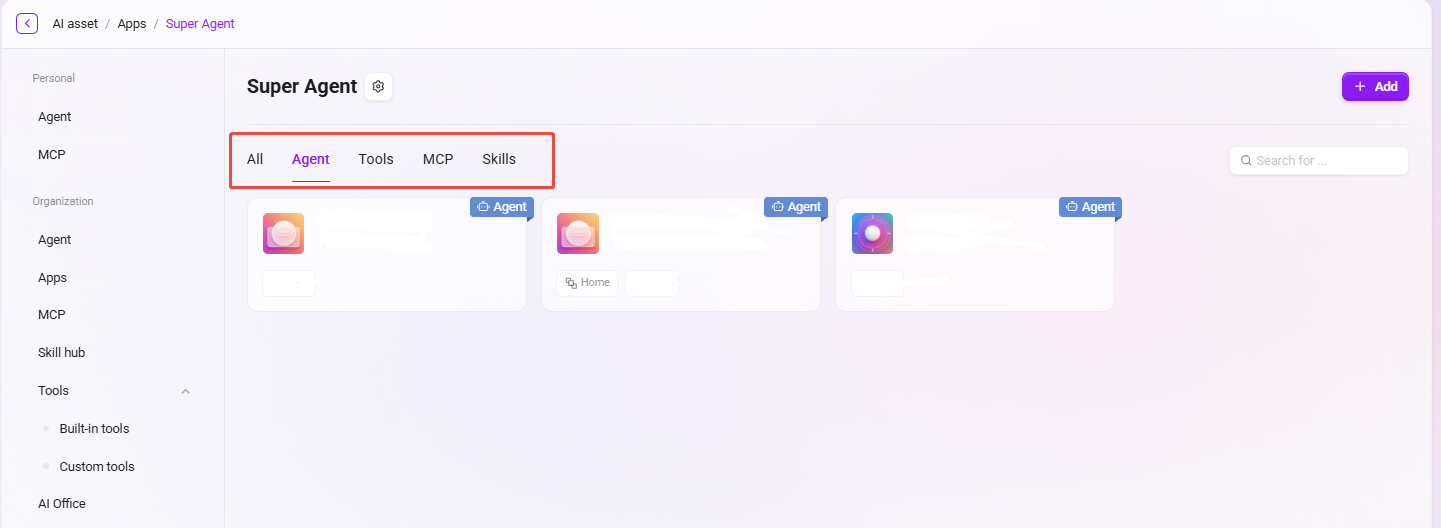
Administrators can go to the configuration page through Management → Apps → Super Agent to view all associated assistants, skills, MCPs, and tools.
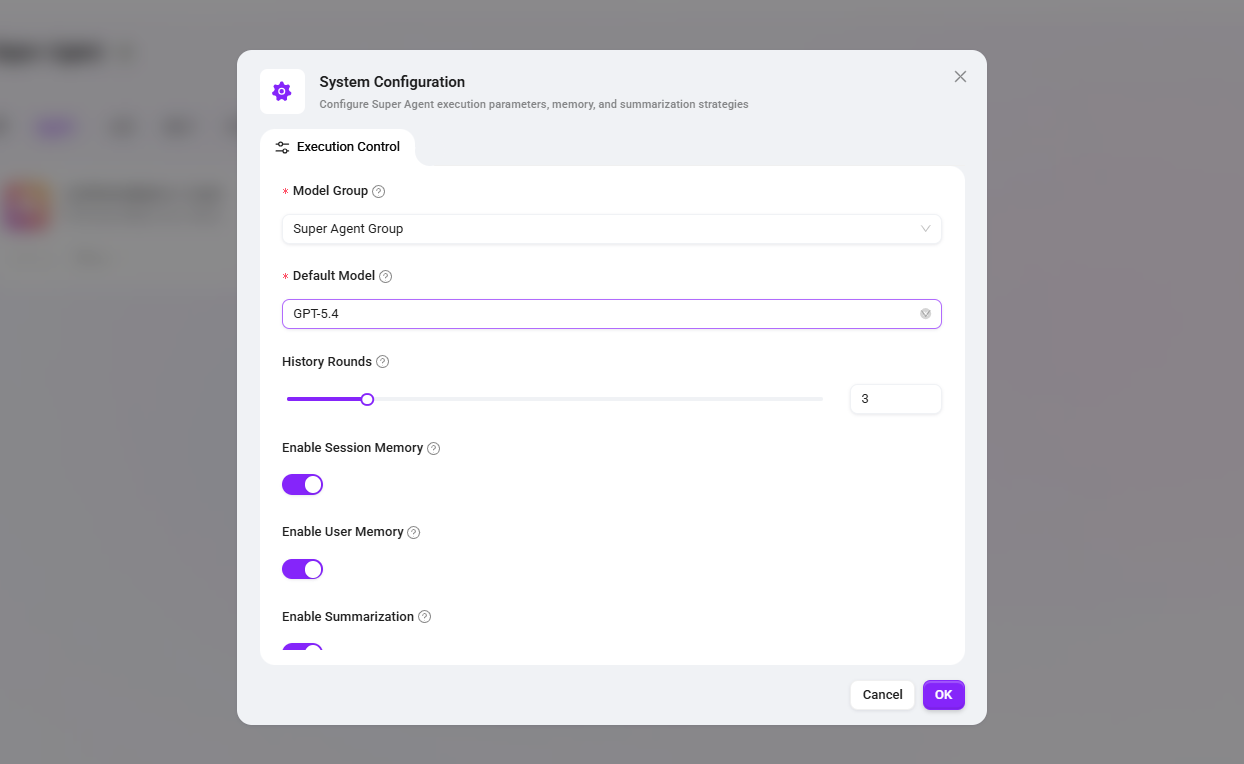
System Configuration
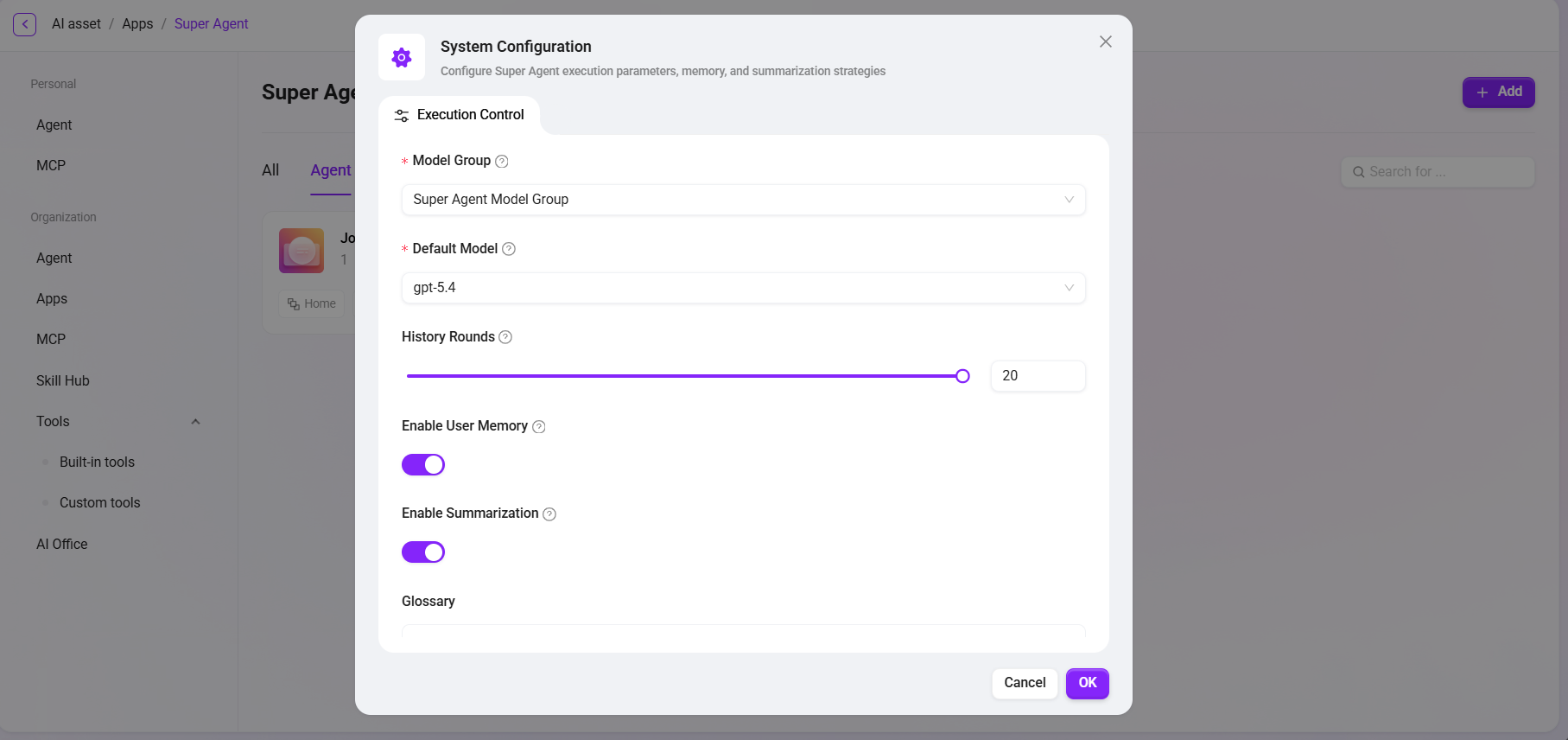
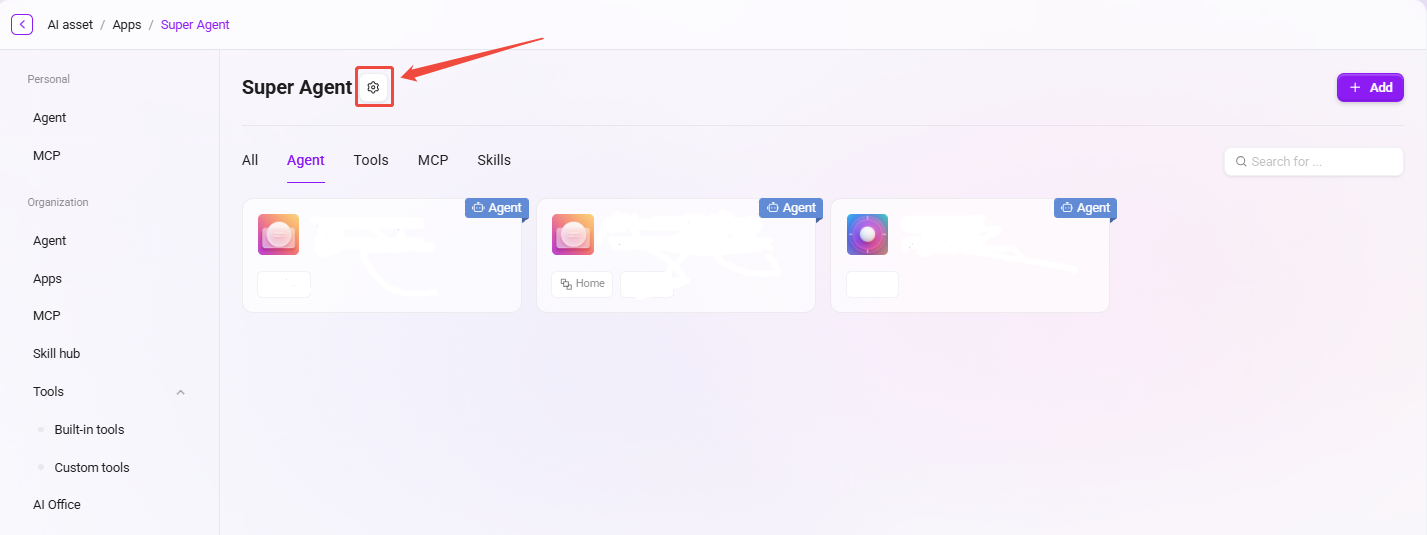
Click the gear icon in the upper right corner of the page to enter the system configuration interface and set the following parameters:
- Model group: Select a dedicated model group for Super Agent to centrally manage the available model range.
- Default model: Set the default model used by Super Agent.
- Number of historical dialogue rounds: Controls the number of historical dialogue rounds carried in context, ranging from 0–20.
- Enable session memory: When enabled, context within the same session will be retained to ensure continuity in multi-turn conversations.
- Enable user memory: When enabled, memory is maintained independently for each user to achieve personalized context awareness.
- Enable summary: When enabled, the system will automatically summarize long conversations to assist memory compression and context management.
- Glossary: Supports adding custom glossaries to ensure accurate and consistent wording for Super Agent in specific business scenarios.
Add Plugins
Click “Add” in the upper right corner of the page to add or remove assistants, skills, MCPs, and tools associated with Super Agent. Super Agent will automatically call the associated capabilities according to the skill configuration.