Configure the Retrieval Pipeline and Agent Q&A
This tutorial is the second article in the "Enterprise Technical Documentation Intelligent Q&A System" series, following the previous article Configure the Preprocessing Pipeline and Knowledge Base Ingestion.
In the previous article, we completed:
- ✅ Preprocessing Pipeline orchestration (text extraction → intelligent chunking → multi-dimensional summary enhancement → vectorized storage)
- ✅ Knowledge base creation and binding to the preprocessing RAG Pipeline
- ✅ Technical document upload and ingestion verification
Based on that foundation, this article will configure the retrieval Pipeline and associate it with an Agent to achieve end-to-end intelligent Q&A capabilities.
💡 Prerequisite: Please ensure that you have completed the previous tutorial and that the knowledge base already contains processed document data.
Step 1: Configure the Retrieval Pipeline
The retrieval Pipeline determines how the most relevant content is recalled from the knowledge base when a user asks a question. Since the preprocessing stage has already generated multi-dimensional enhanced data (paragraph summaries, image descriptions, table summaries), this data can be leveraged during retrieval to improve recall quality.
Create a Retrieval Pipeline
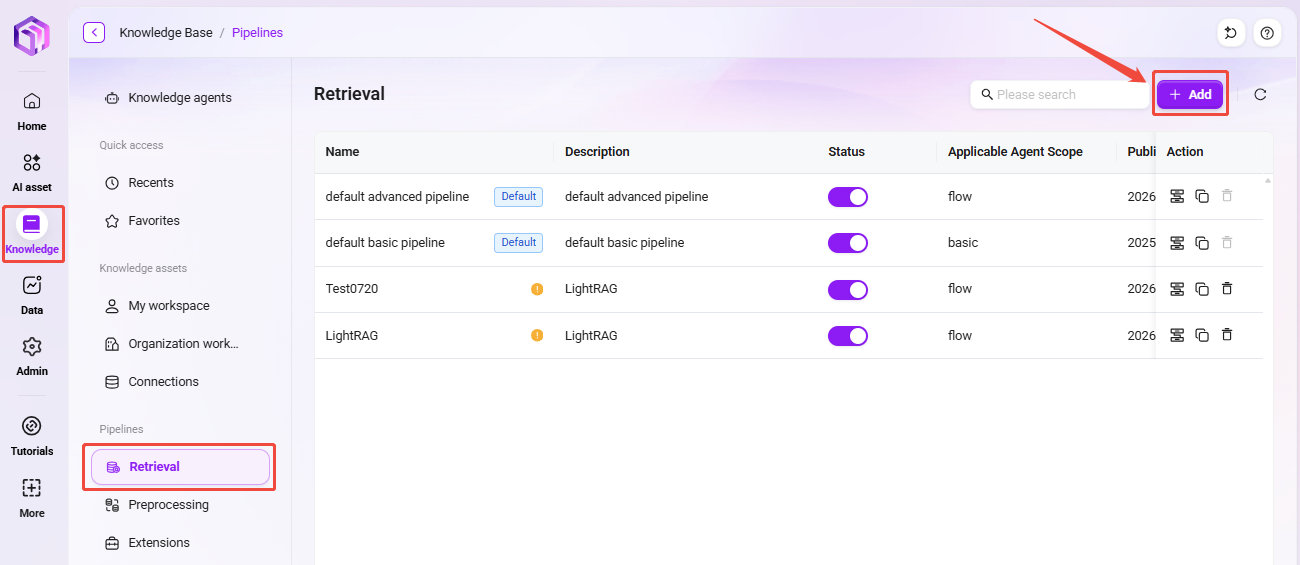
- On the Knowledge Base page, switch to the "Retrieval Pipeline" tab.
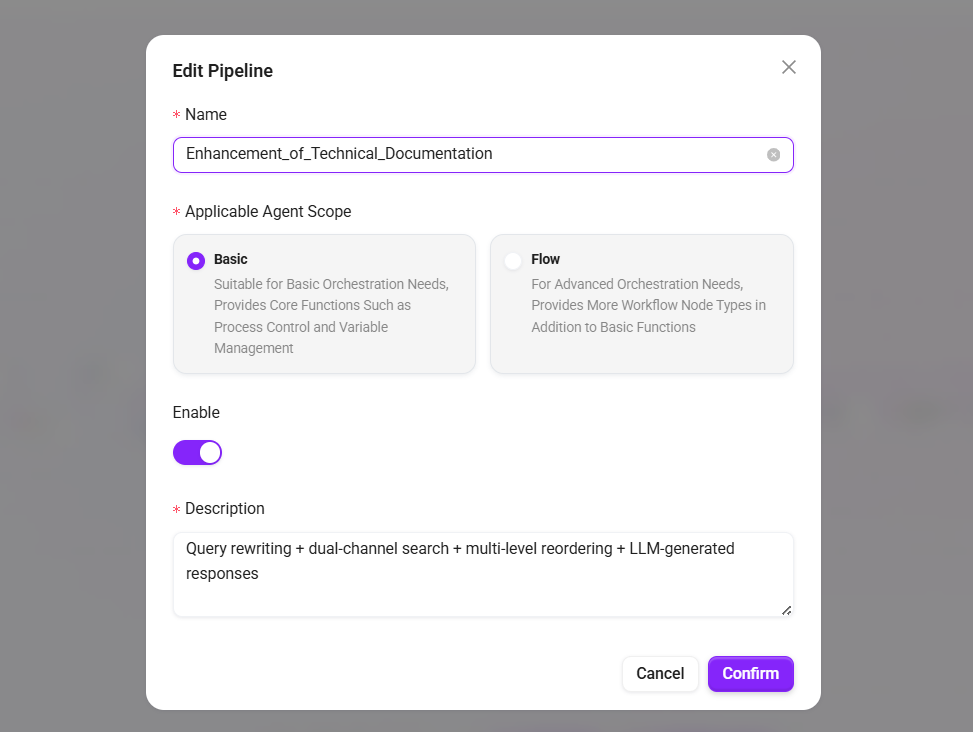
- Click "+ Create Pipeline" and fill in:
- Name:
Technical Documentation Enhanced Retrieval - Applicable Agent Scope: select
Basic Orchestration - Description:
Query rewriting + dual-channel retrieval + multi-level reranking + LLM-generated answers
- Name:
- Click "Confirm" to enter the orchestration interface.
Configure Retrieval Nodes
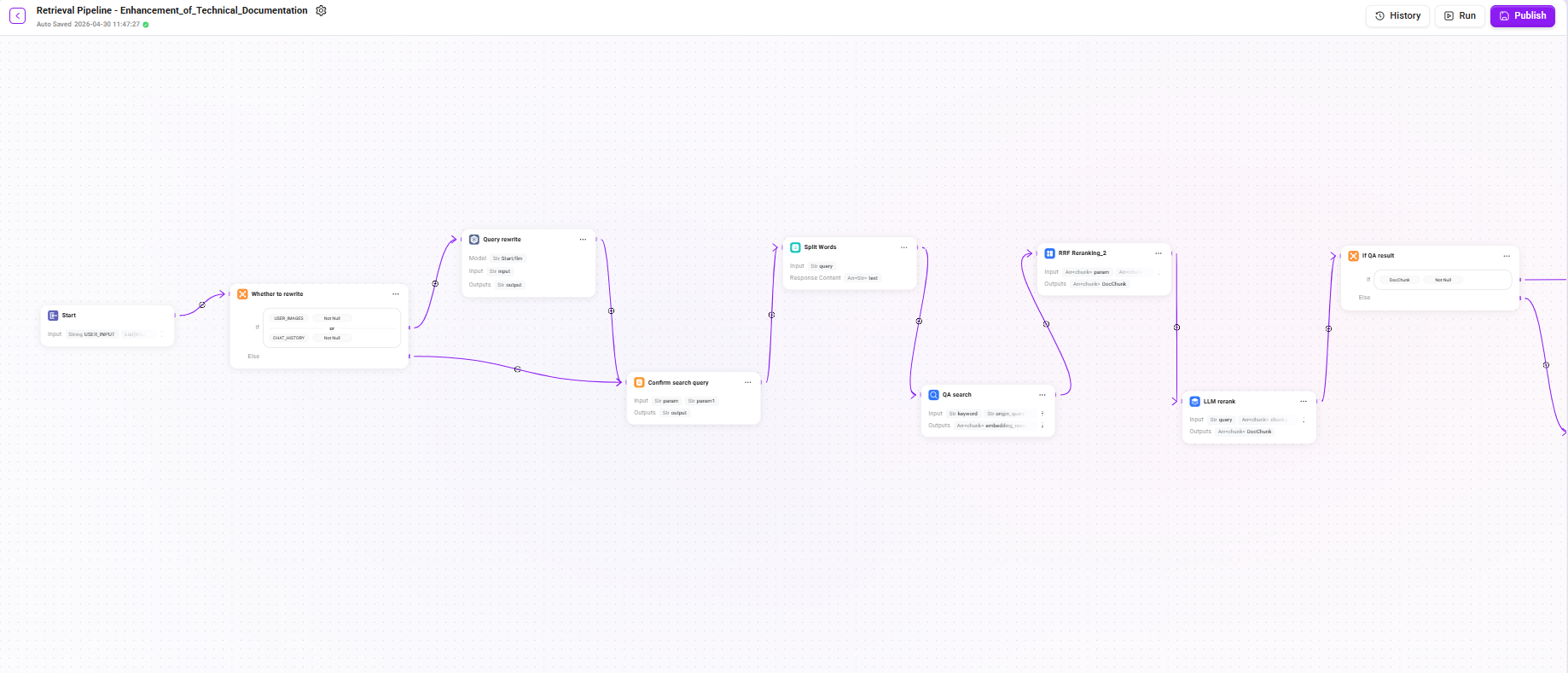
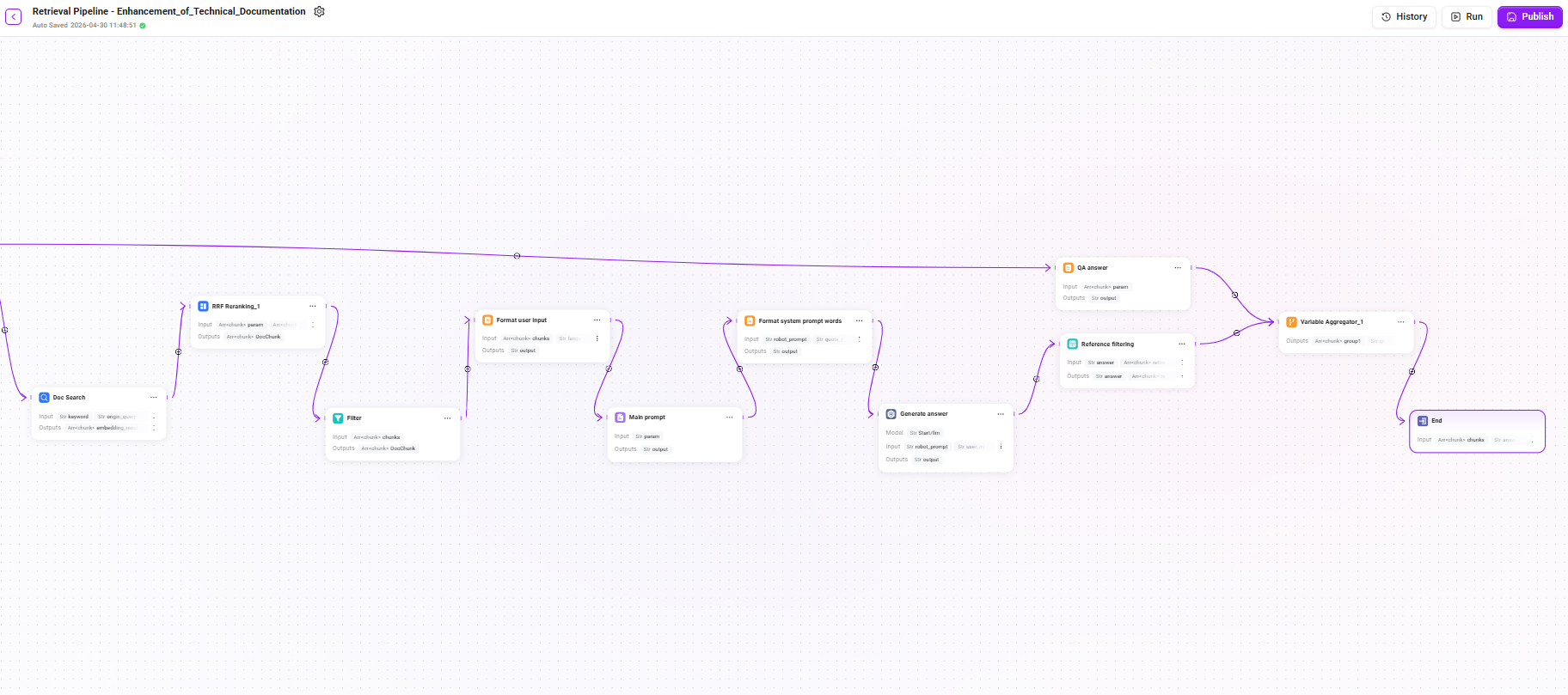
This retrieval Pipeline adopts a multi-stage progressive architecture, including query rewriting, dual-channel retrieval, multi-level reranking, conditional fallback, and LLM-generated answers. Since the chain is relatively long, it is explained in detail below in three stages.
Stage 1: Query Understanding and Retrieval
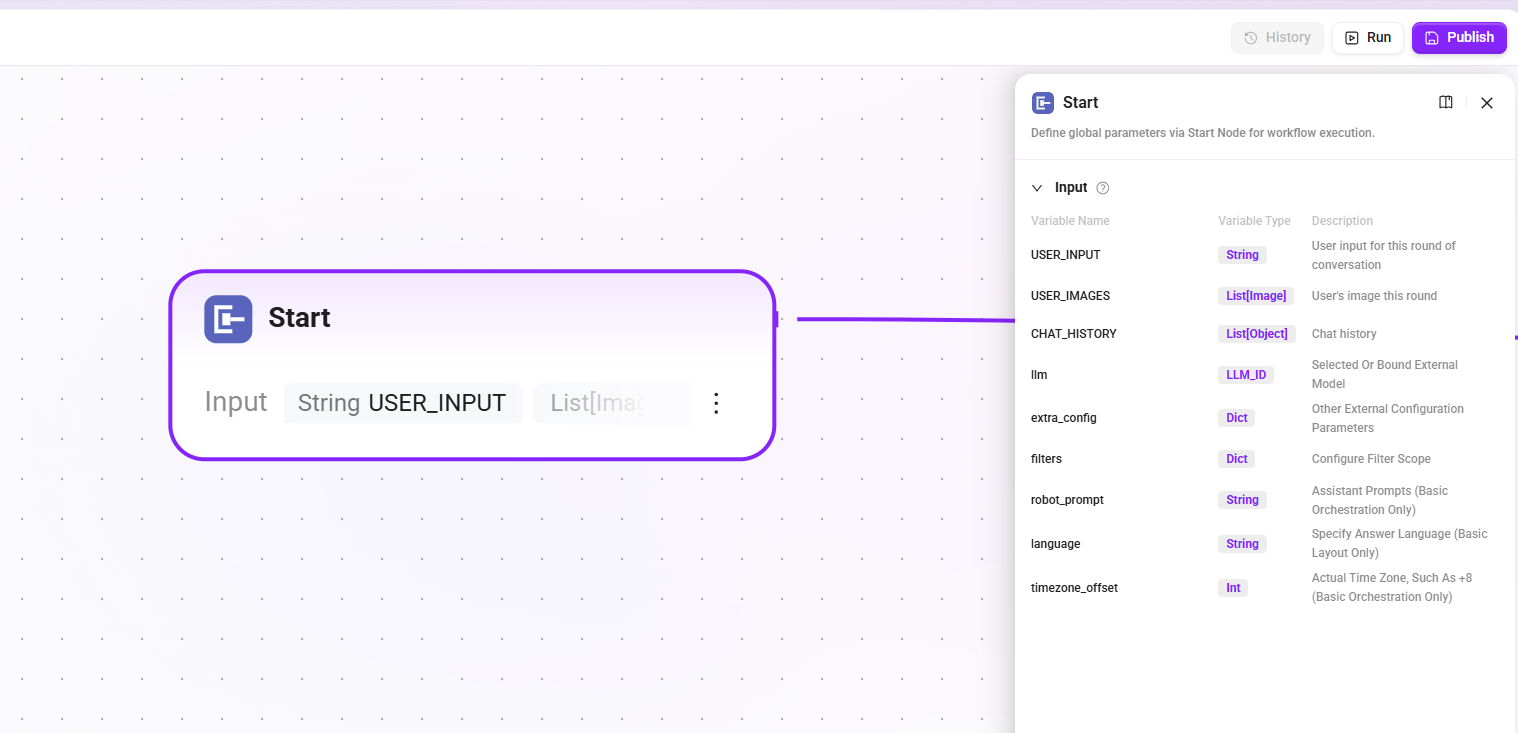
1. Start node
Define the input parameters required to start the workflow. These contents will be read by the LLM during the assistant conversation process, enabling the LLM to start the workflow at the appropriate time and fill in the correct information.
- Input:
USER_INPUT(the user's input in the current turn),CHAT_HISTORY(chat history),USER_IMAGES(images input by the user in the current turn), etc.
2. Whether to rewrite (conditional judgment)
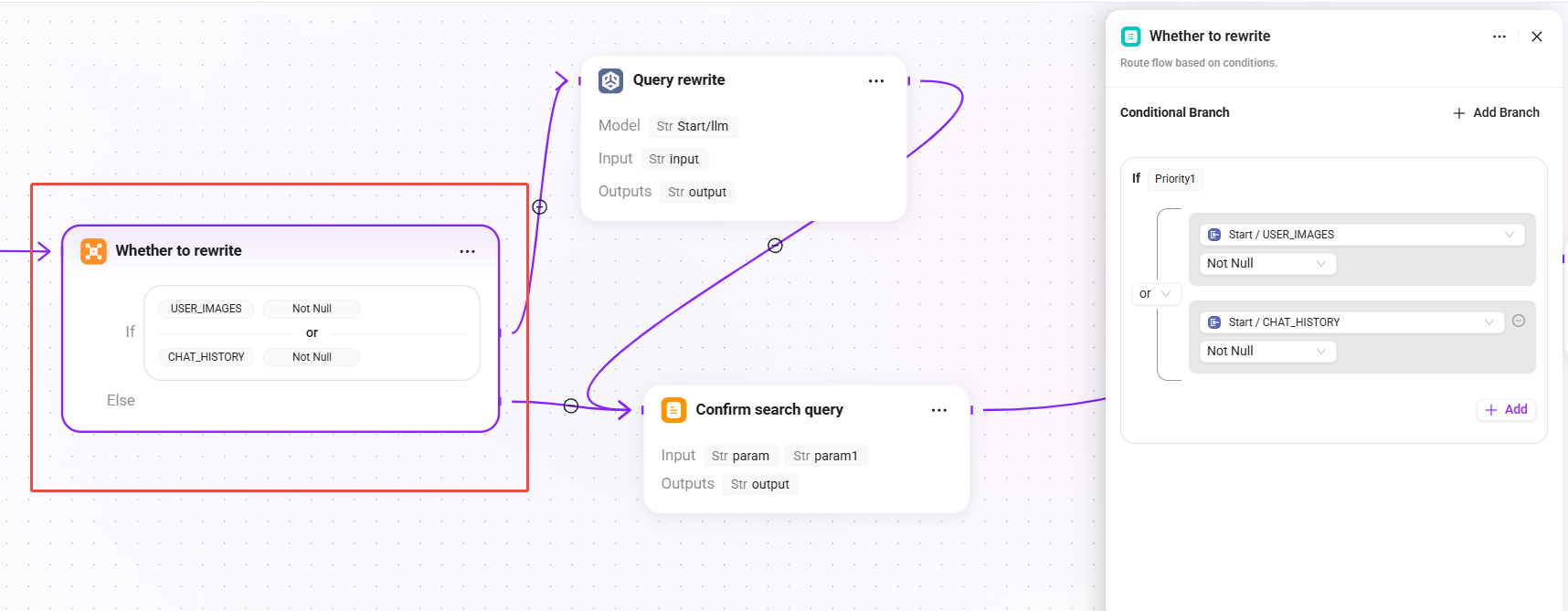
Determine whether the user query needs to be rewritten based on the current session context:
- Condition: when
USER_IMAGESis not empty orCHAT_HISTORYis not empty, enter the "Query Rewrite" branch. - else: skip the rewrite process and go directly to the "Confirm Search Query" node, using the original question as the final query.
💡 When there is multi-turn conversation history, the user's latest question may be a referential expression (such as "What are its parameters?"), in which case it needs to be rewritten into a complete query to improve retrieval effectiveness.
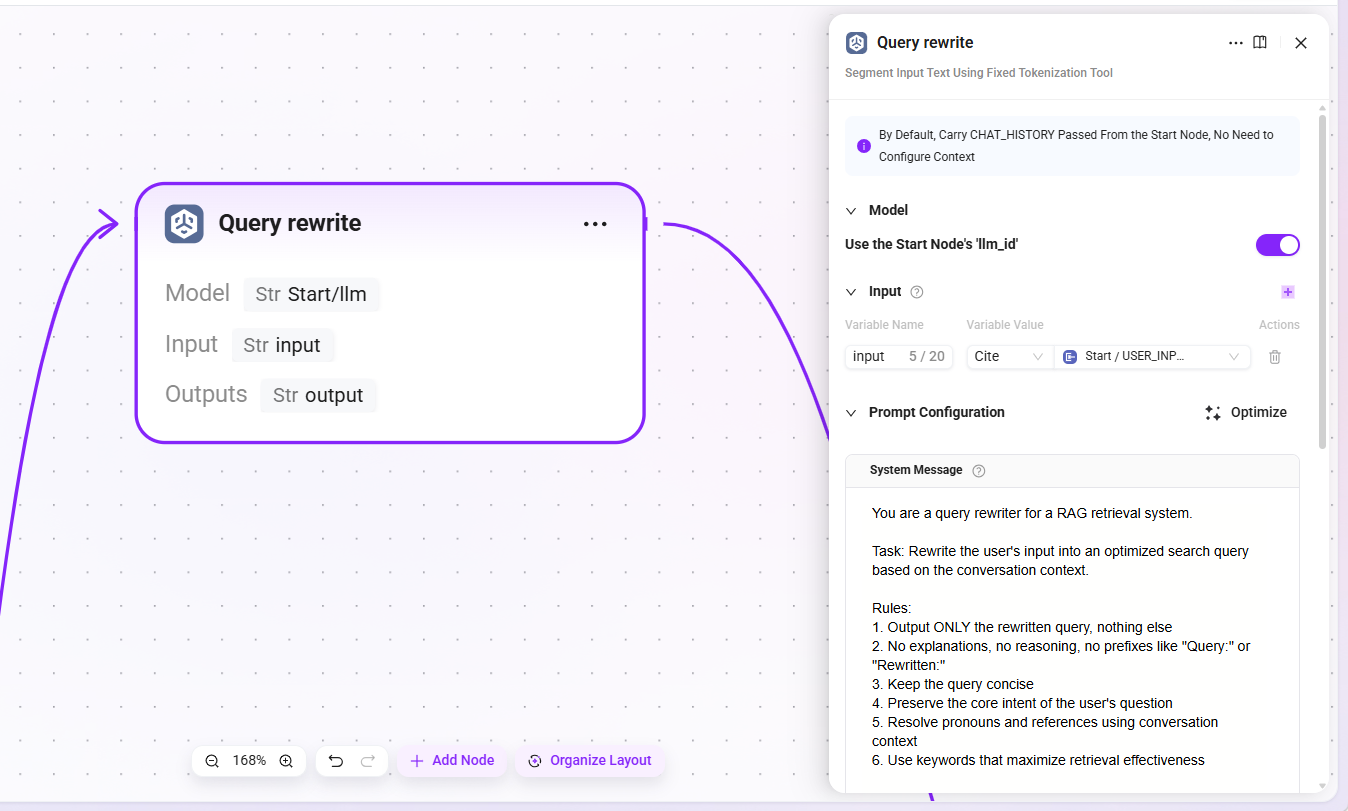
3. Query rewrite
- Model: reuse the LLM configured in the start node (
llm_id) - Input:
USER_INPUT(the original question text entered by the user) - Output:
output(the rewritten complete query statement)
The LLM will combine context to replace ambiguous references with explicit expressions, for example rewriting "How is it configured?" as "How is the retrieval Pipeline of the knowledge base configured?"
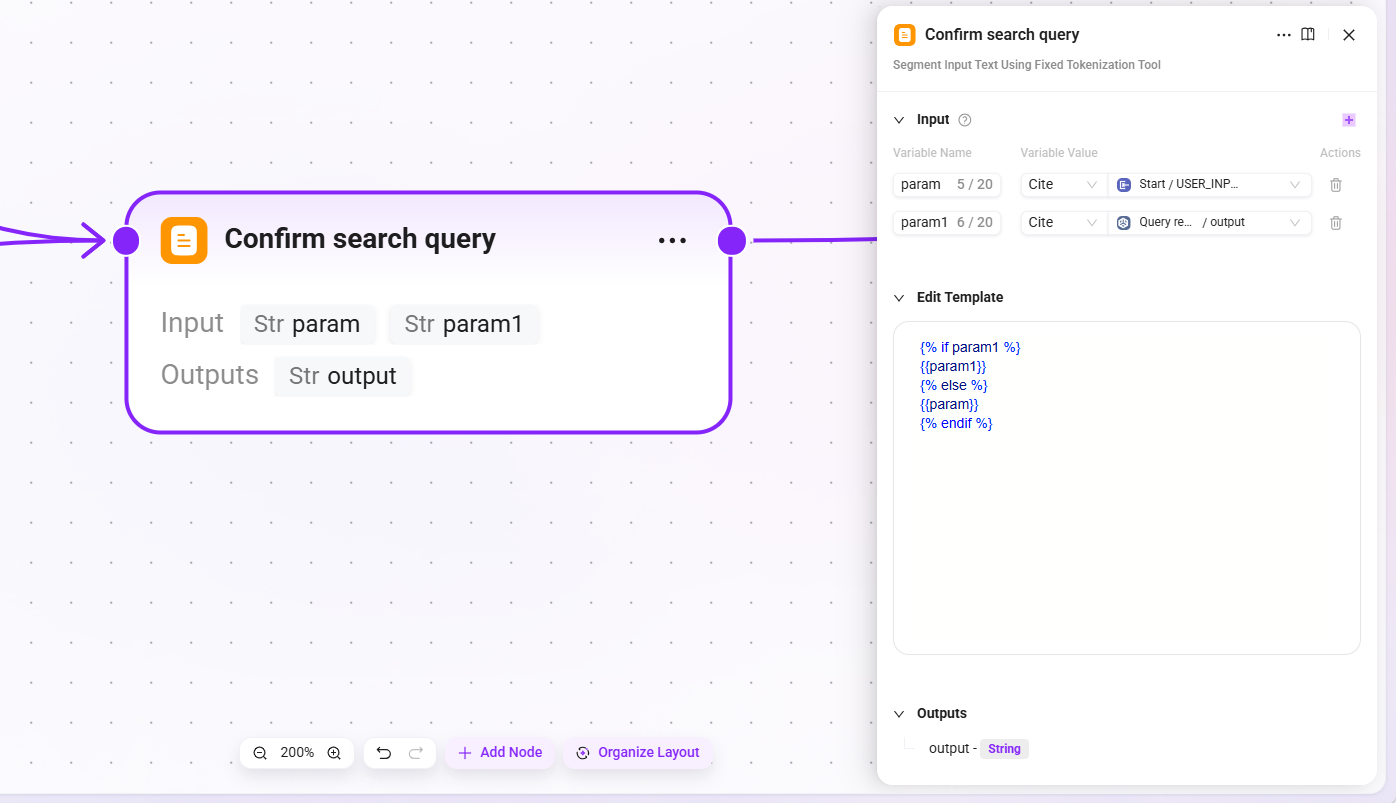
4. Confirm search query
- Input::
param(original user input),param1(result after query rewriting) - Output:
output(the final confirmed search query)
This node ensures that whether or not rewriting has occurred, there is always a definite query statement passed to downstream retrieval nodes.
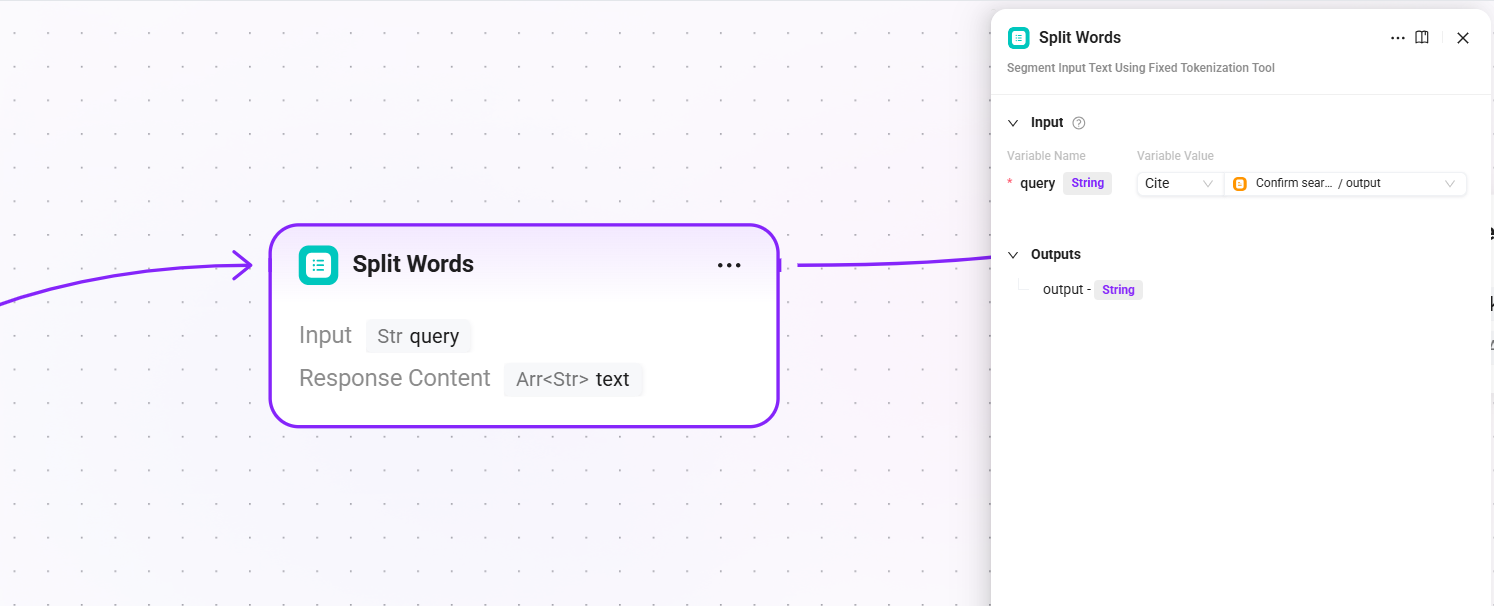
5. Split Words (word segmentation)
- Input:
query(the final query text after search query confirmation) - Output:
text(segmentation result, used as keywords for full-text retrieval)
Perform word segmentation on the query and extract keywords for use in the full-text matching channels of subsequent QA retrieval and document retrieval.
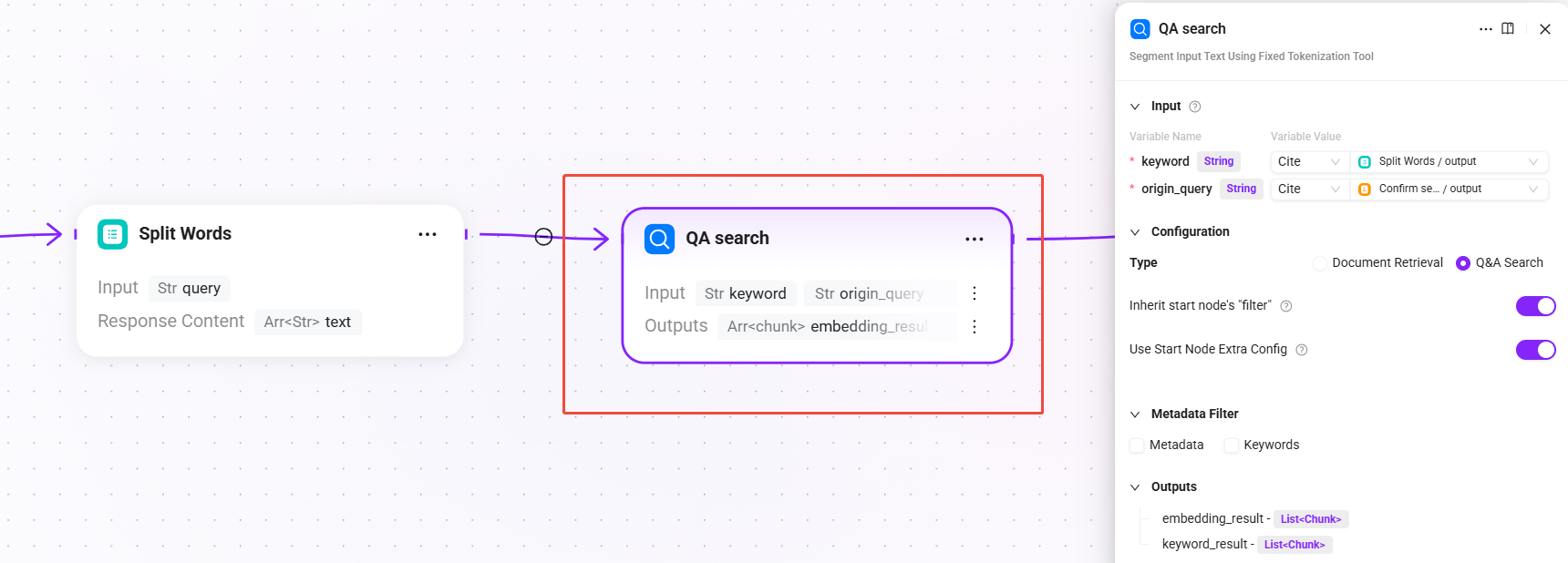
6. QA search (QA knowledge retrieval)
- Input:
keyword(keywords after segmentation),origin_query(the final query text after search query confirmation) - Configuration: select
Q&A Retrieval, withReuse start node filtersandReuse start node extra_configenabled by default - Output:
embedding_result(retrieval results from the QA knowledge base),keyword_result(QA matching results based on keyword full-text retrieval)
Priority is given to retrieving from the QA question-answer pair knowledge base. The QA knowledge base usually contains curated standard Q&A pairs, with a high hit rate and stable answer quality.
Stage 2: Multi-level Reranking and Conditional Fallback
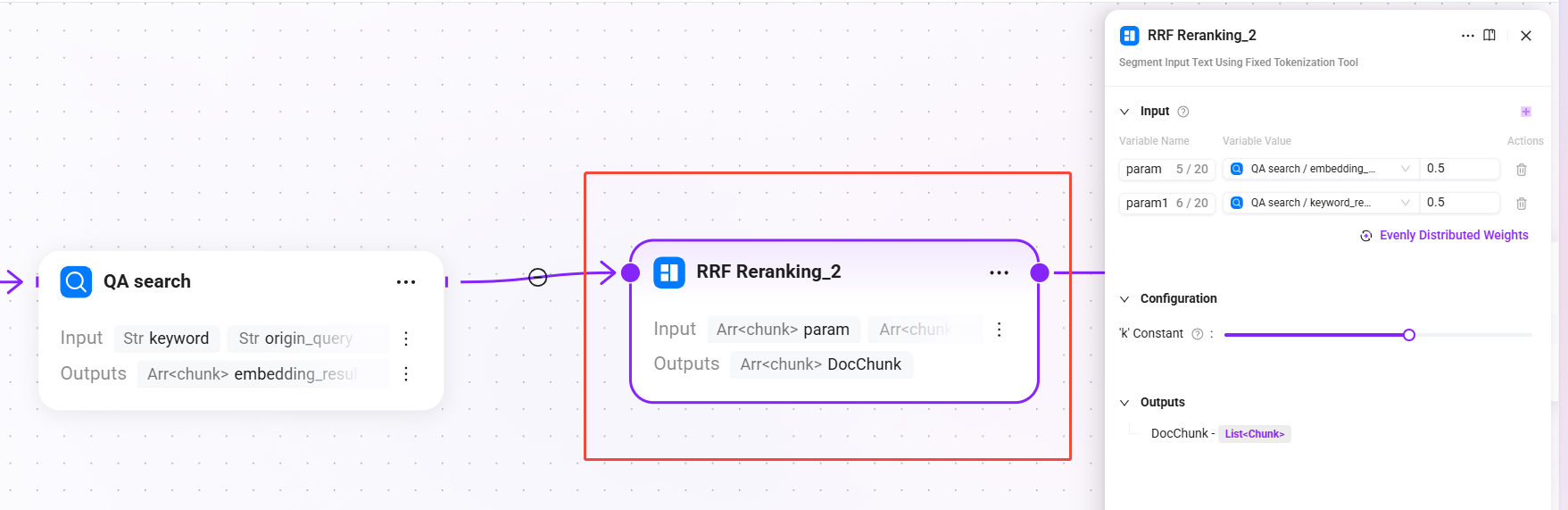
7. RRF Reranking_2 (RRF fusion reranking)
Segment the input text using a fixed word segmentation tool
- Input:
param(semantic vector recall results from QA retrieval),param1(keyword full-text matching recall results from QA retrieval)- The weights of the two input paths are evenly split, each being 0.5
- Configuration:
-
- k constant:
60(0-100, used to control the decay rate of ranking on the final score; the larger the value, the more gradual the weight decay for lower-ranked results)
- k constant:
-
- Output:
DocChunk(reranked document chunks)
Use the RRF (Reciprocal Rank Fusion) algorithm to fuse and rank QA retrieval results, combining ranking information from multiple recall paths to generate a unified relevance ranking.
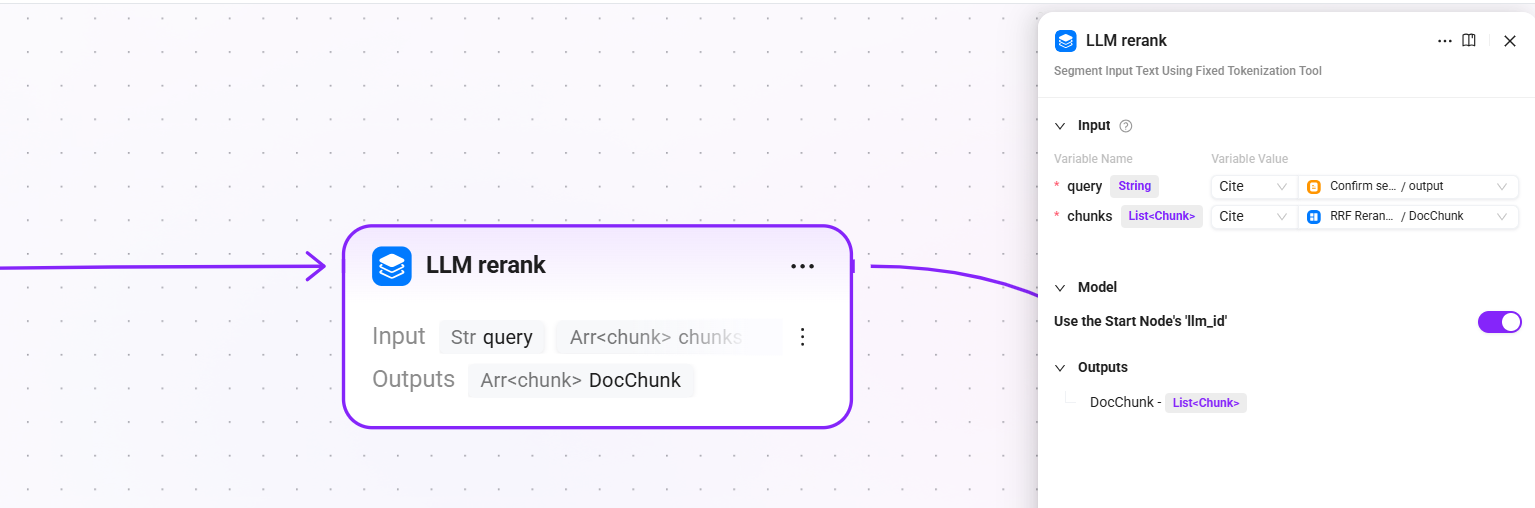
8. LLM rerank (LLM fine reranking)
- Input:
query(the final query text after search query confirmation),chunk(reranked document chunks) - Configuration: reuse the LLM configured in the start node (
llm_id) - Output:
DocChunk(fine-reranked chunks)
Call the LLM to perform semantic-level fine reranking on candidate chunks, judging the relevance of each chunk to the user's question one by one. Compared with traditional Reranker models, it has stronger semantic understanding capabilities.
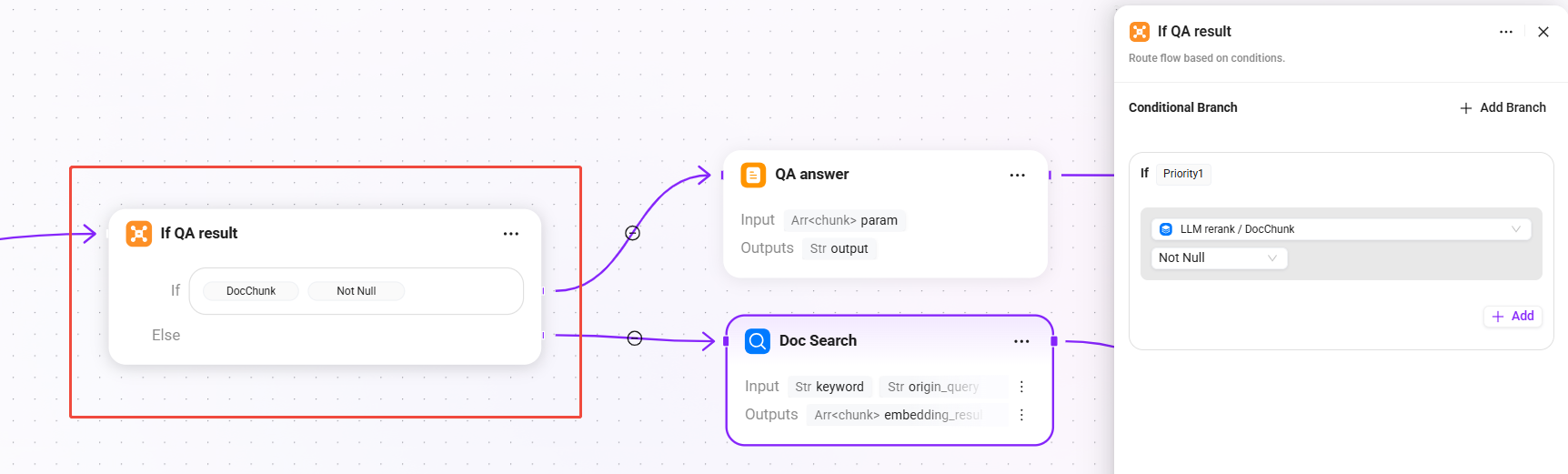
9. If QA result (conditional judgment - whether the QA result is valid)
- Condition: when
DocChunkis not empty, directly use the QA retrieval + reranking result - else: if the QA result is empty, trigger document fallback retrieval
This is the key design of this Pipeline: prioritize high-quality answers from the QA knowledge base, and only fall back to document chunk retrieval when QA cannot hit, balancing answer quality and recall coverage.
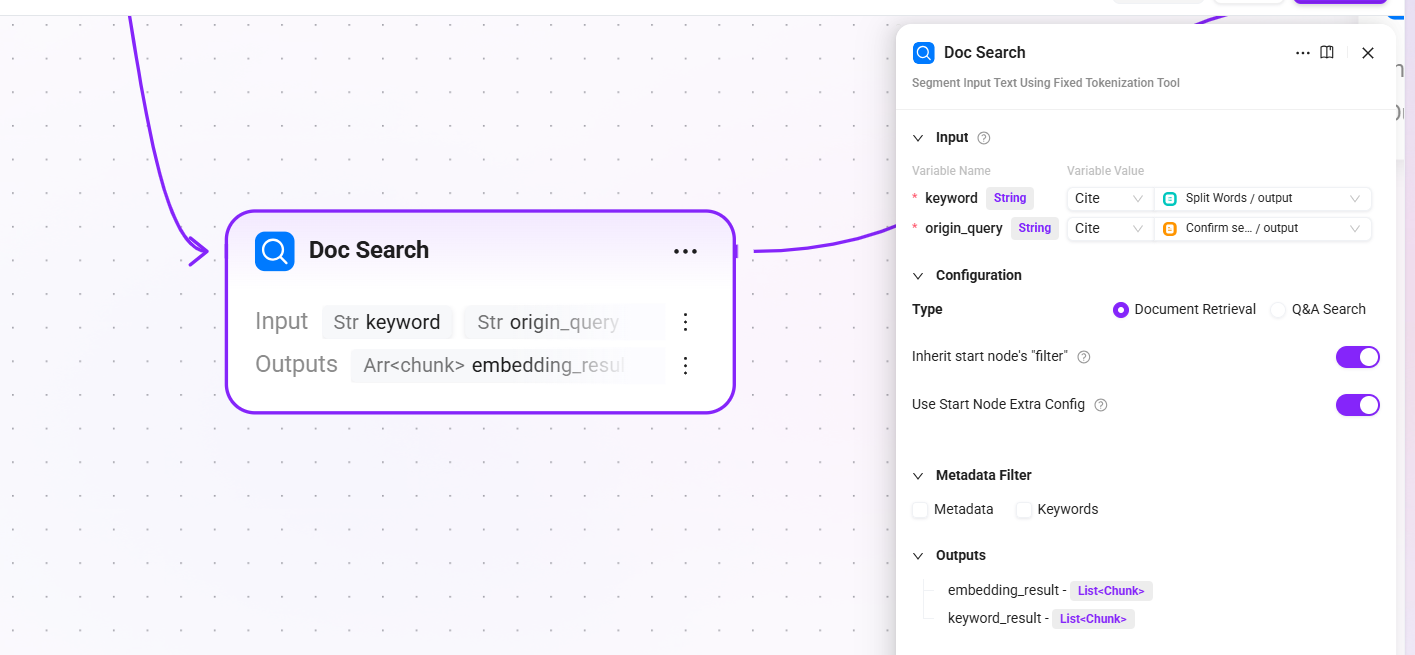
10. Doc Search (document retrieval - fallback channel)
- Input:
keyword(keywords after segmentation),origin_query(the final confirmed query text) - Configuration: select
Document Retrieval, withReuse start node filtersandReuse start node extra_configenabled by default - Output:
embedding_result(list of document chunks hit by semantic vector retrieval) andkeyword_result(list of document chunks hit by keyword full-text matching)
When QA retrieval returns no result, perform vector + full-text fusion retrieval from the document chunks stored during the preprocessing stage to ensure that the user's question does not go unanswered.
11. RRF Reranking_1 (document retrieval reranking)
- Input:
param(semantic vector recall results from document retrieval),param1(keyword full-text matching recall results from document retrieval) - Configuration:
kconstant:60(the same decay control value used in QA retrieval reranking to ensure a consistent ranking strategy)
- Output:
DocChunk(reranked document chunks)
Perform RRF fusion reranking on the results of document fallback retrieval as well, ensuring the relevance ranking quality of returned results.
Stage 3: Answer Generation and Output
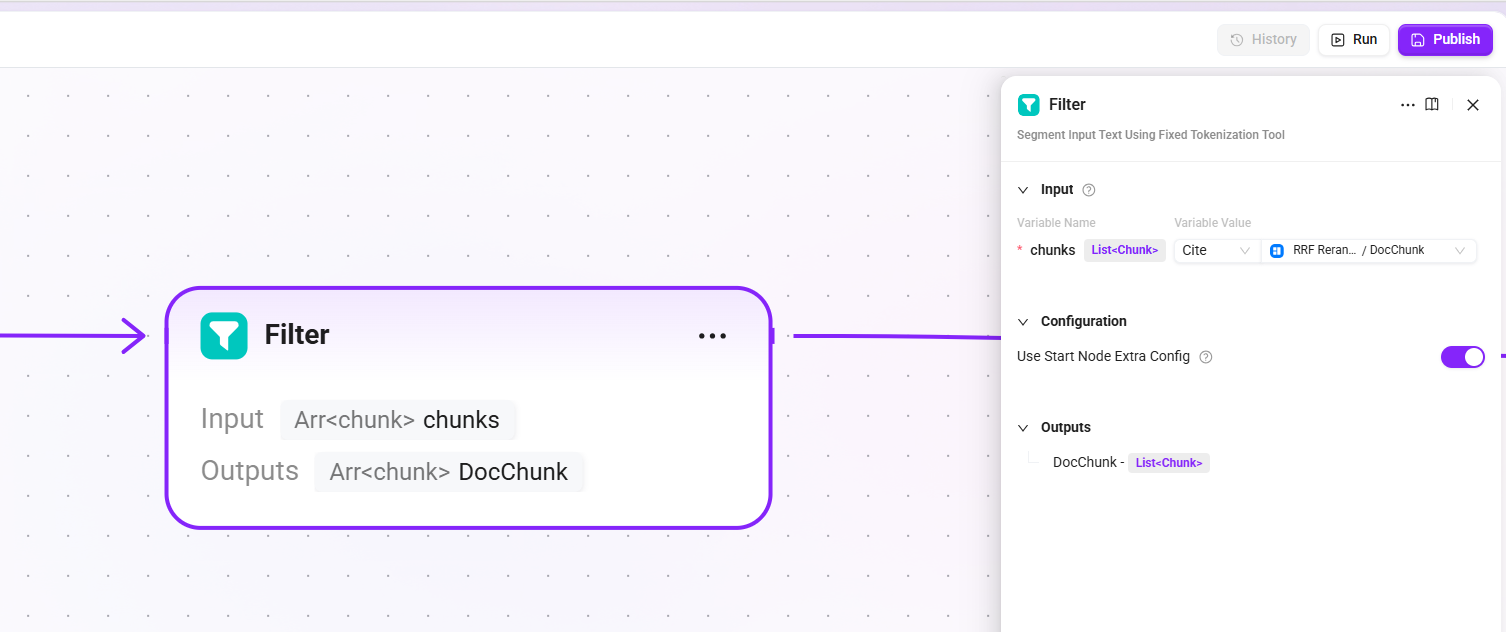
12. Filter
- Input:
chunks(candidate chunk list from document retrieval reranking) - Model: reuse the LLM configured in the start node (
llm_id) - Output:
DocChunk(highly relevant chunks retained after LLM filtering, with noise or weakly relevant content removed)
Filter the final recalled chunks to remove low-relevance or duplicate chunks, ensuring that the context passed to the LLM is concise and effective.
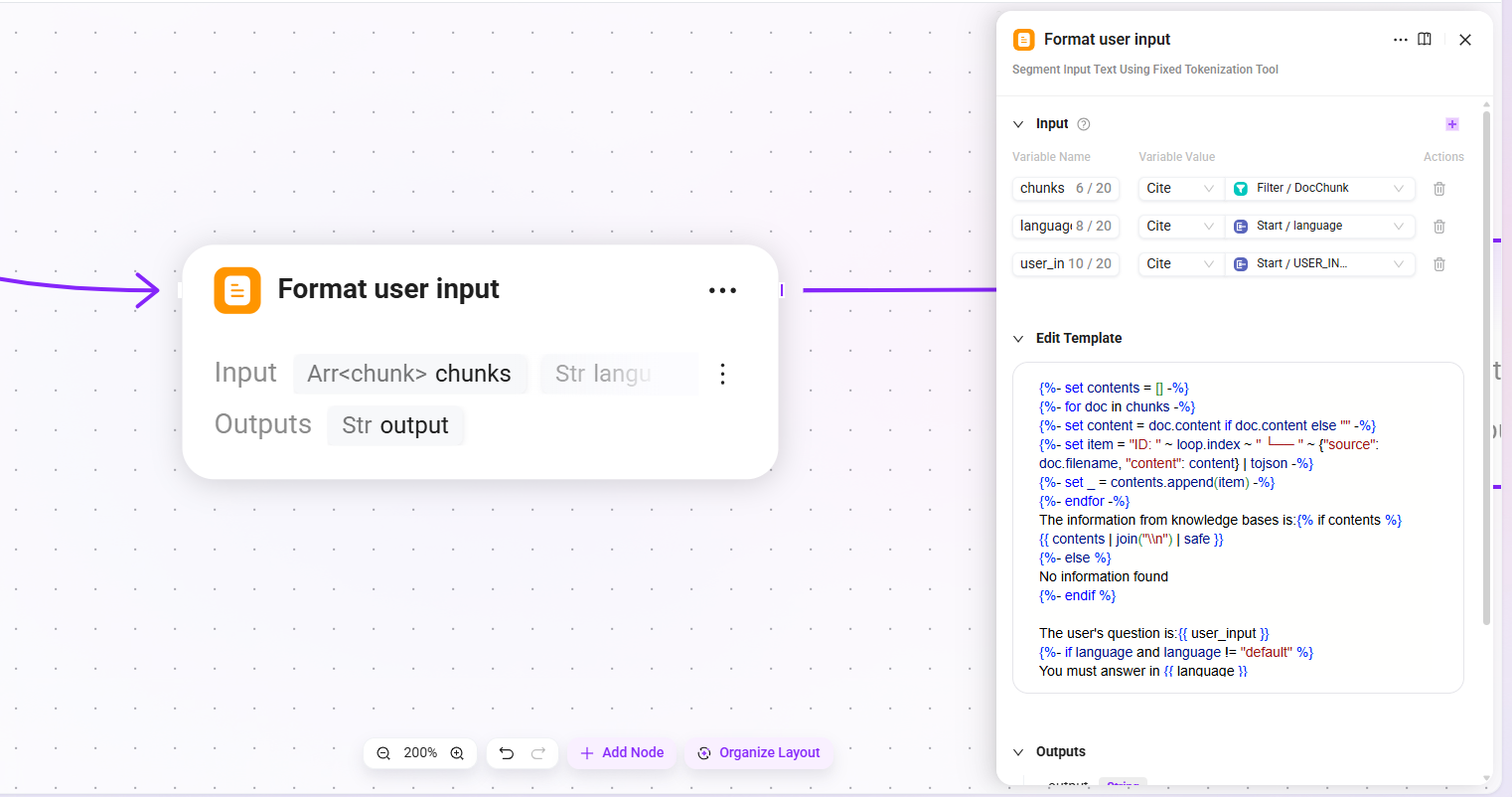
13. Format user input
- Input:
chunks(filtered list of highly relevant document chunks),language(the language of the user's input),user_input(the user's input content) - Output:
output(formatted user context)
Concatenate the recalled document chunks and the user's question according to the specified template format to form the user-side input for the LLM.
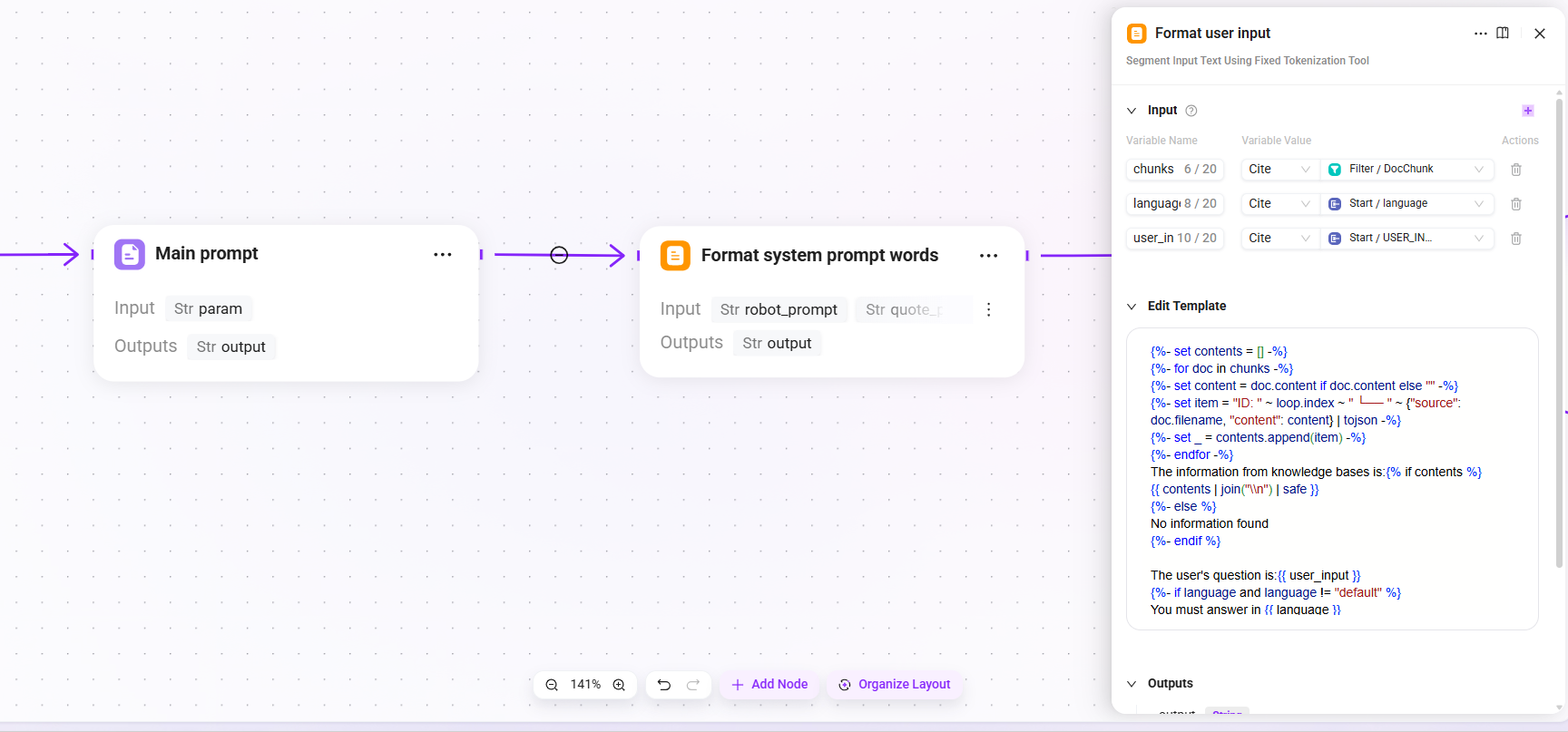
14. Main prompt (main prompt assembly)
- Mode: string concatenation
- Input:
param(formatted user context) - Output:
output(assembled main prompt content)
15. Format system prompt words
- Input:
robot_prompt(assistant prompt),quote_prompt(assembled main prompt content),time_diff_hour(actual time zone) - Output:
output(complete System Prompt, used as the system-level instruction for the LLM)
Integrate the Agent's persona description, behavioral constraints, and retrieval context template into a complete System Prompt.
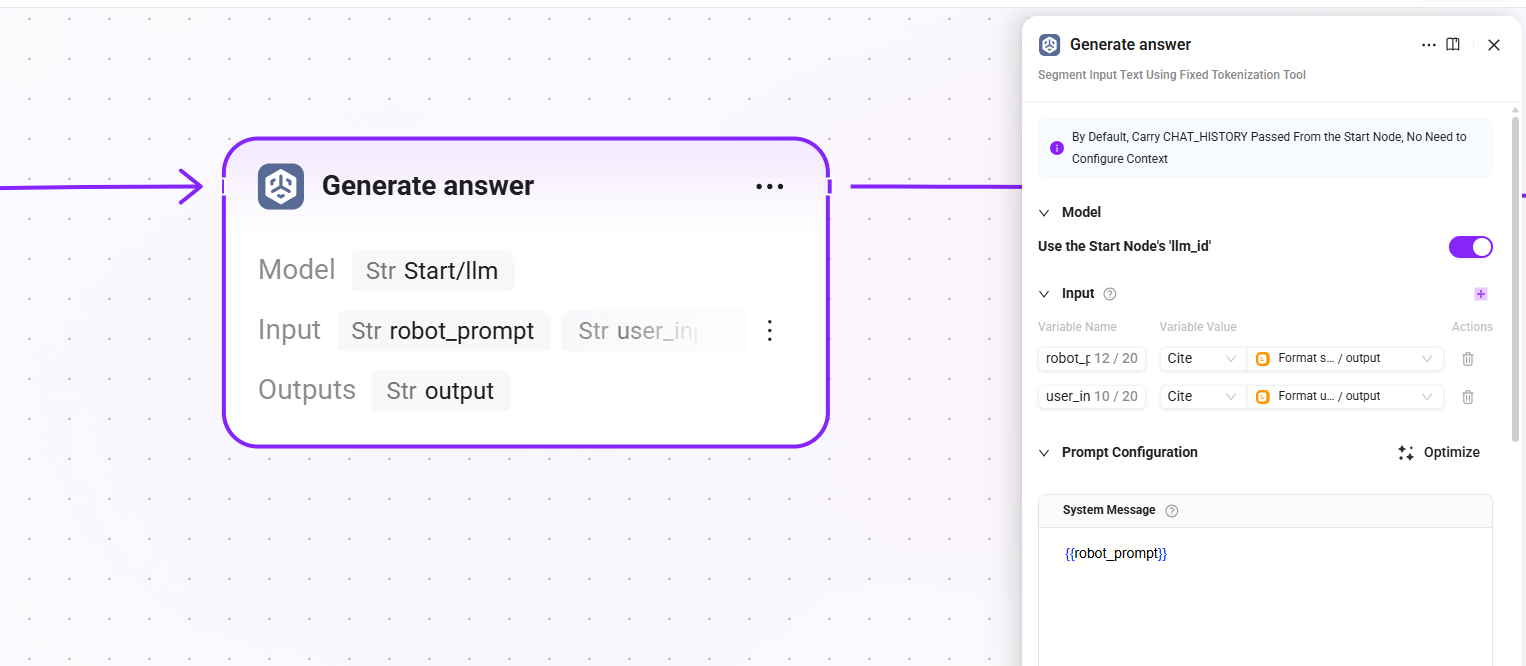
16. Generate answer
- Model: reuse the LLM configured in the start node (
llm_id) - Input:
robot_prompt(complete system prompt),user_input(formatted user context) - Output:
output(final answer text generated by the LLM)
The core generation node, where the LLM generates the final answer for the user based on the retrieved document chunks and system prompt.
17. Reference filtering
- Input:
answer(final answer text generated by the LLM),retrival_docs(filtered list of highly relevant document chunks) - Output:
answer(answer),reference(list of chunks actually cited in or used as the basis for the answer, filtered fromretrieval_docs)
Filter out the chunks that are actually cited in the answer from the candidate chunks and display them to the user as reference sources, enhancing answer traceability.
18. QA answer (QA answer processing)
- Input:
param(fine-reranked chunks) - Output:
output(processed answer structure)
Format the standard answers produced by the QA channel.
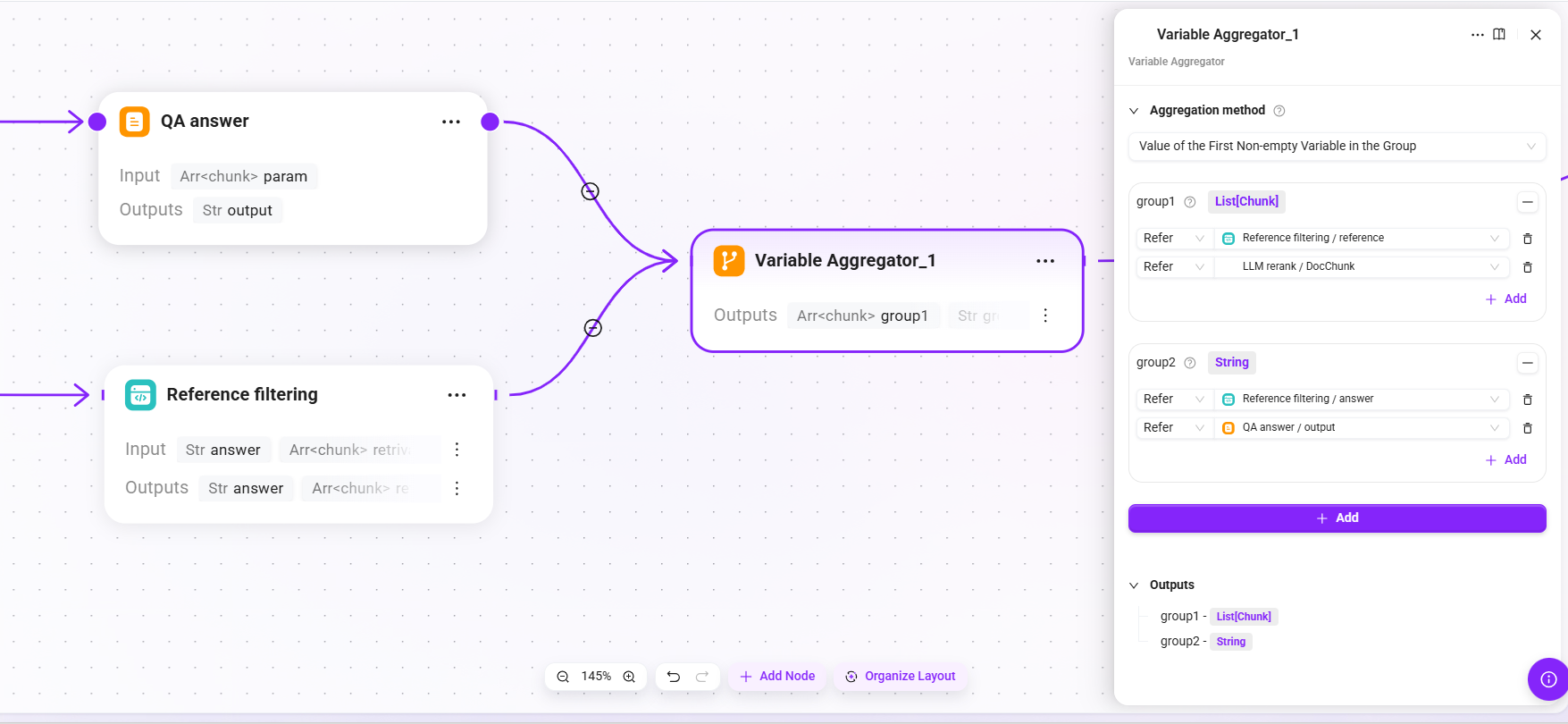
19. Variable Aggregator_1 (result aggregation)
- Aggregation strategy: the value of the first non-empty variable in each group
- Input:
- group1:
- The
referencelist output by Reference filtering. - Chunks after LLM Rerank fine reranking
- The
- group2:
- The
answertext output by Reference filtering. - The
outputfrom QA answer.
- The
- group1:
- Output:
group1(the final list of reference sources used),group2(the final answer text returned to the user)
Aggregate the outputs of QA answers and reference filtering into a unified final return structure.
20. End (end of process)
- Output:
chunks(aggregatedgroup1, i.e., the final confirmed list of reference citations),answer(aggregatedgroup2, i.e., the final answer text returned to the user)
Output the final result to the caller (Agent), including the answer content and reference citations.
Summary of the Complete Retrieval Chain
Retrieval Testing and Publishing
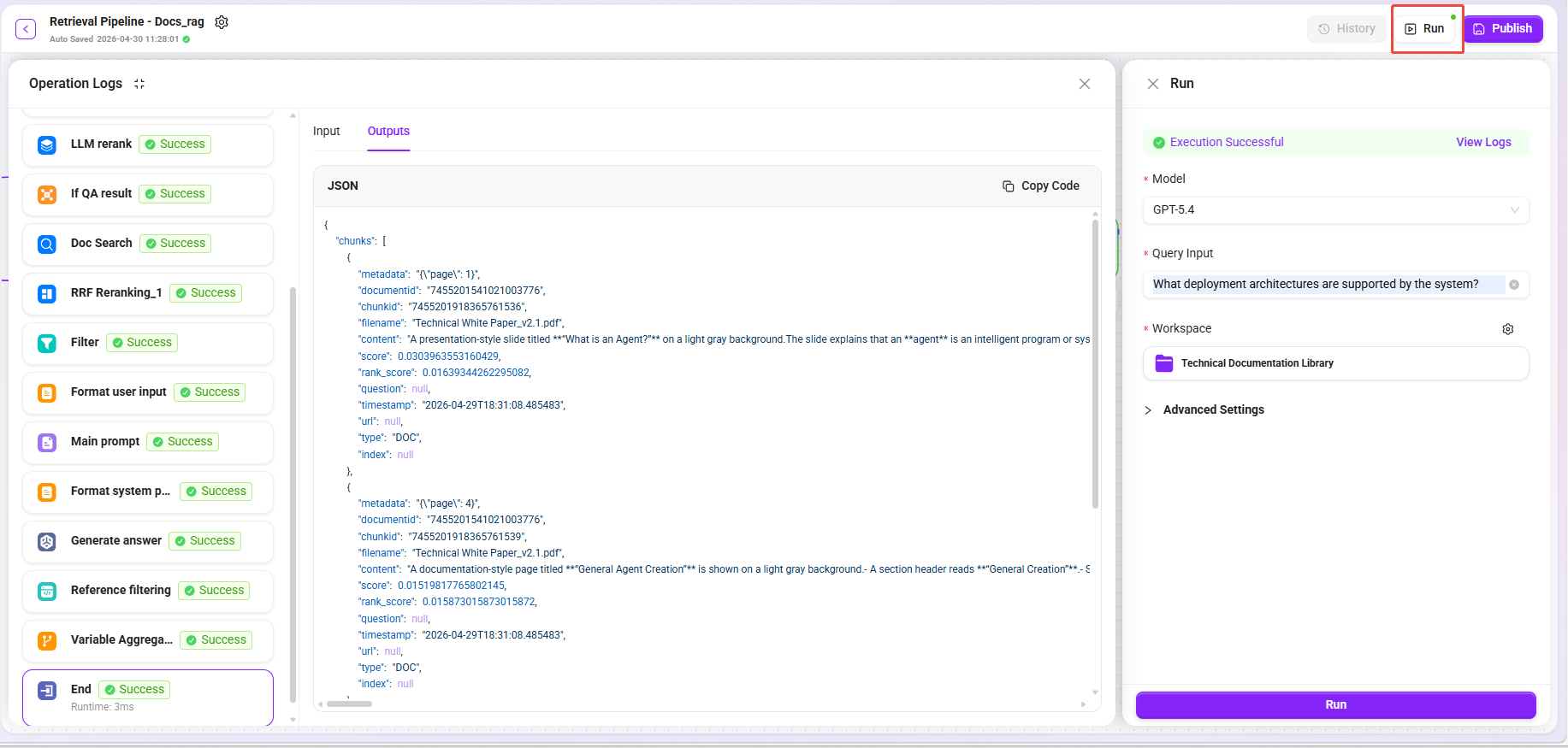
- Click the "Trial Run" button. 2,Select model: GPT-5.4
- Enter different types of questions:
| Test Question | Expected Recall Type |
|---|---|
What deployment architectures does the system support? | Text paragraphs + architecture diagram descriptions |
Comparison of performance metrics for each module | Table summary-related chunks |
What is the data processing flow? | Flowchart descriptions + related text paragraphs |
- Select knowledge base: Technical Documentation Library
- Confirm that the recalled results cover multi-dimensional data (original text + summaries + image descriptions + table summaries).
- After confirming that the test results meet expectations, click "Publish".
Step 2: Create an Agent and Apply the Retrieval RAG Pipeline
Associate the configured retrieval Pipeline with an Agent to complete end-to-end intelligent Q&A verification.
Create or Configure an Agent
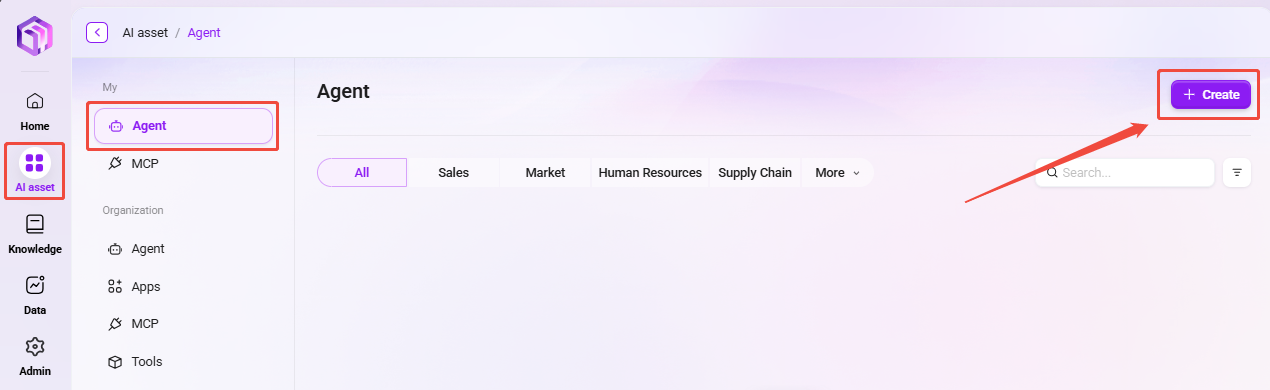
- Go to AI Asset Module → Agent Management.
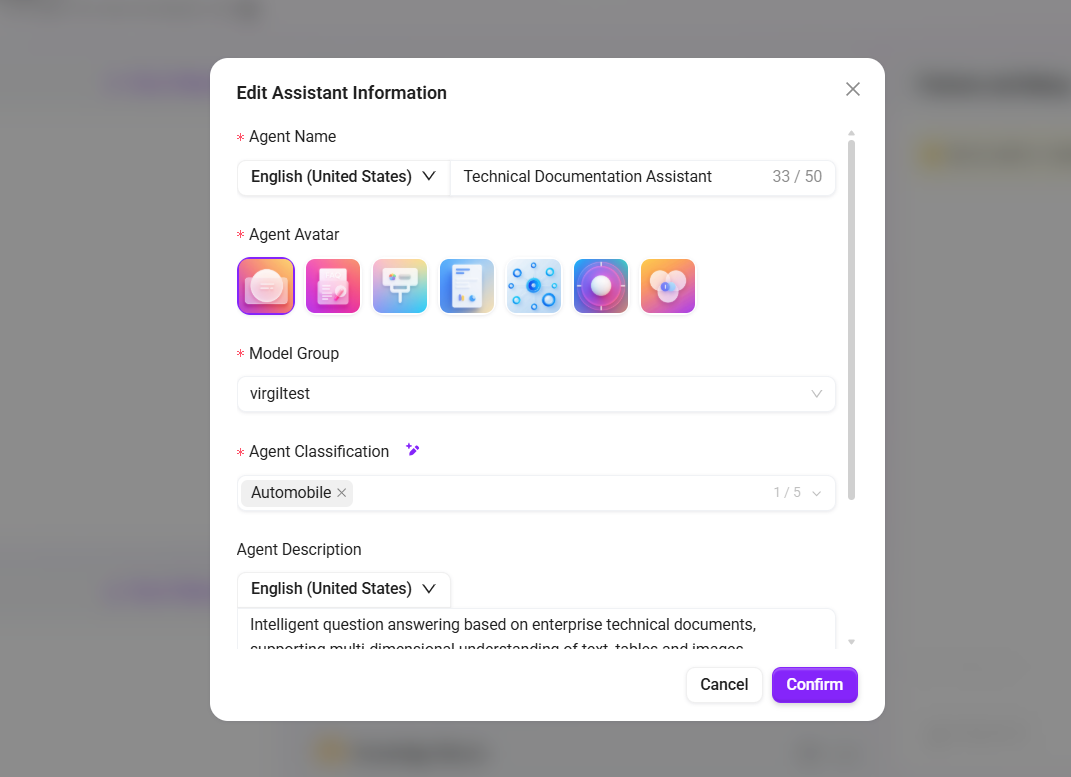
- Create a basic Agent or select an existing Agent, and fill in:
- Name:
Technical Documentation Assistant - Description:
Intelligent Q&A based on enterprise technical documentation, supporting multi-dimensional understanding of text, tables, and images
- Name:
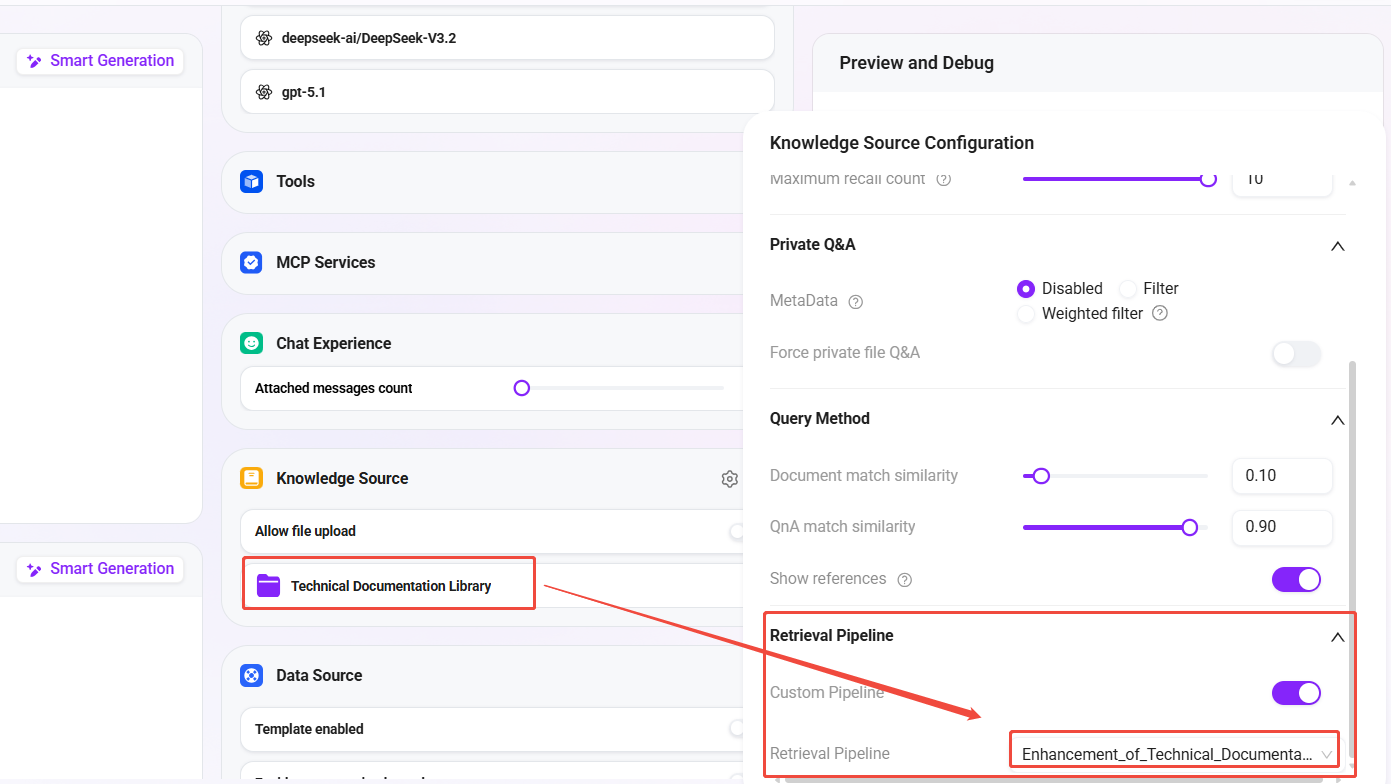
- In the Agent's Knowledge Base Configuration:
- Associate knowledge base:
Technical Documentation Library(the knowledge base created in the previous article) - Retrieval Pipeline: select
Technical Documentation Enhanced Retrieval
- Associate knowledge base:
- Save the Agent configuration.
Verify Intelligent Q&A Effectiveness
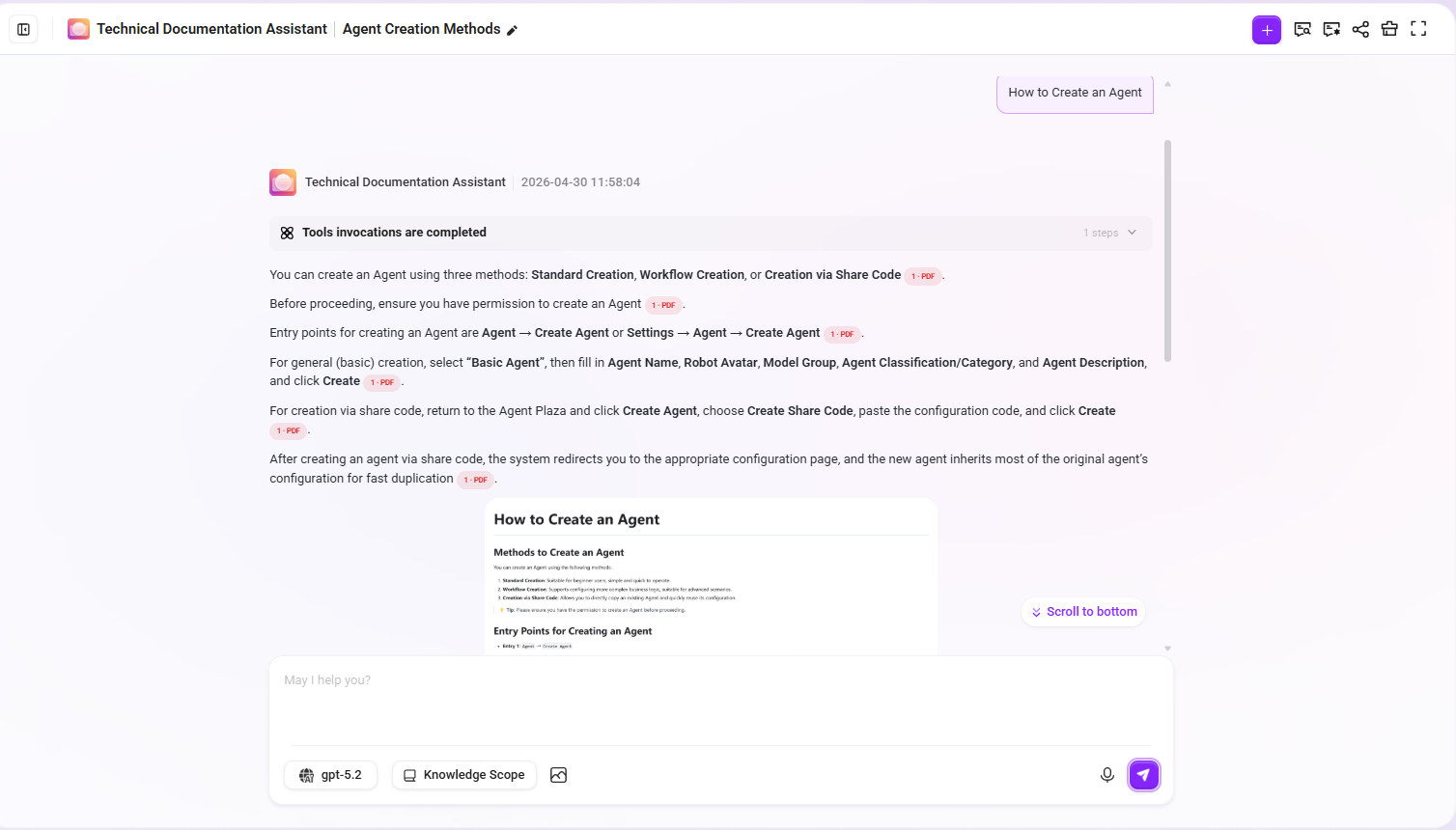
Enter the Agent conversation interface and perform the following test:
Question: How do I create an Agent?
Expected effect:
- The answer content comes from the document paragraphs about creating an Agent
- The cited chunks include the original paragraph text and summary enhancement information
- If the document contains related step diagrams, those images also participate in recall
Summary of Results
By combining the previous article (preprocessing Pipeline + knowledge base) and this article (retrieval Pipeline + Agent), we have completed an end-to-end intelligent Q&A system with deep document understanding capabilities:
| Stage | Configuration Content | Effect |
|---|---|---|
| Preprocessing Pipeline | Text extraction → intelligent chunking → multi-dimensional enhancement → storage | Documents are fully understood and indexed; text/images/tables are all retrievable |
| Knowledge Base RAG Pipeline Mode | Directly bind the preprocessing RAG Pipeline when creating the knowledge base | Upload and process immediately, automatically executing full-chain preprocessing |
| Retrieval Pipeline | Query rewriting → dual-channel retrieval → multi-level reranking → LLM generation | Understand user intent, accurately recall, and intelligently generate answers |
| Agent Association | Knowledge base + retrieval Pipeline binding | End-to-end intelligent Q&A is available |
Highlights of Retrieval Pipeline Design
- Query rewriting: Automatically completes referential questions based on conversation history, improving retrieval accuracy in multi-turn conversations
- QA priority + document fallback: A dual-channel strategy that balances answer quality and coverage
- Multi-level reranking: RRF fusion ranking + LLM semantic fine reranking, progressively improving Top-K quality
- End-to-end generation: The retrieval Pipeline has a built-in LLM generation stage, completing the full process from retrieval to answer in a single chain
- Citation traceability: Reference filtering automatically marks the document chunks cited in the answer
Further Optimization Suggestions
- Optimize query rewrite Prompt: Customize rewrite prompts according to the business domain to improve rewrite quality
- Adjust RRF parameters: Adjust the k value parameter of RRF according to actual recall performance
- LLM rerank cost control: If call volume is high, consider replacing LLM fine reranking with a lightweight Reranker model
- Expand the QA knowledge base: Continuously supplement high-frequency Q&A pairs to improve the hit rate of the QA channel
- Monitor retrieval logs: Use Pipeline run history to locate recall quality issues and response time bottlenecks
Related Documents
- Configure the Preprocessing Pipeline and Knowledge Base Ingestion (the first article in this series)
- RAG Pipeline Feature Description
- Knowledge Base Management