Service Integration Guide
This document describes how to integrate the SERVICEME NEXT application with other websites or SSO (Single Sign-On) services to achieve unified cross-system identity authentication and seamless access.
1. Basic Process
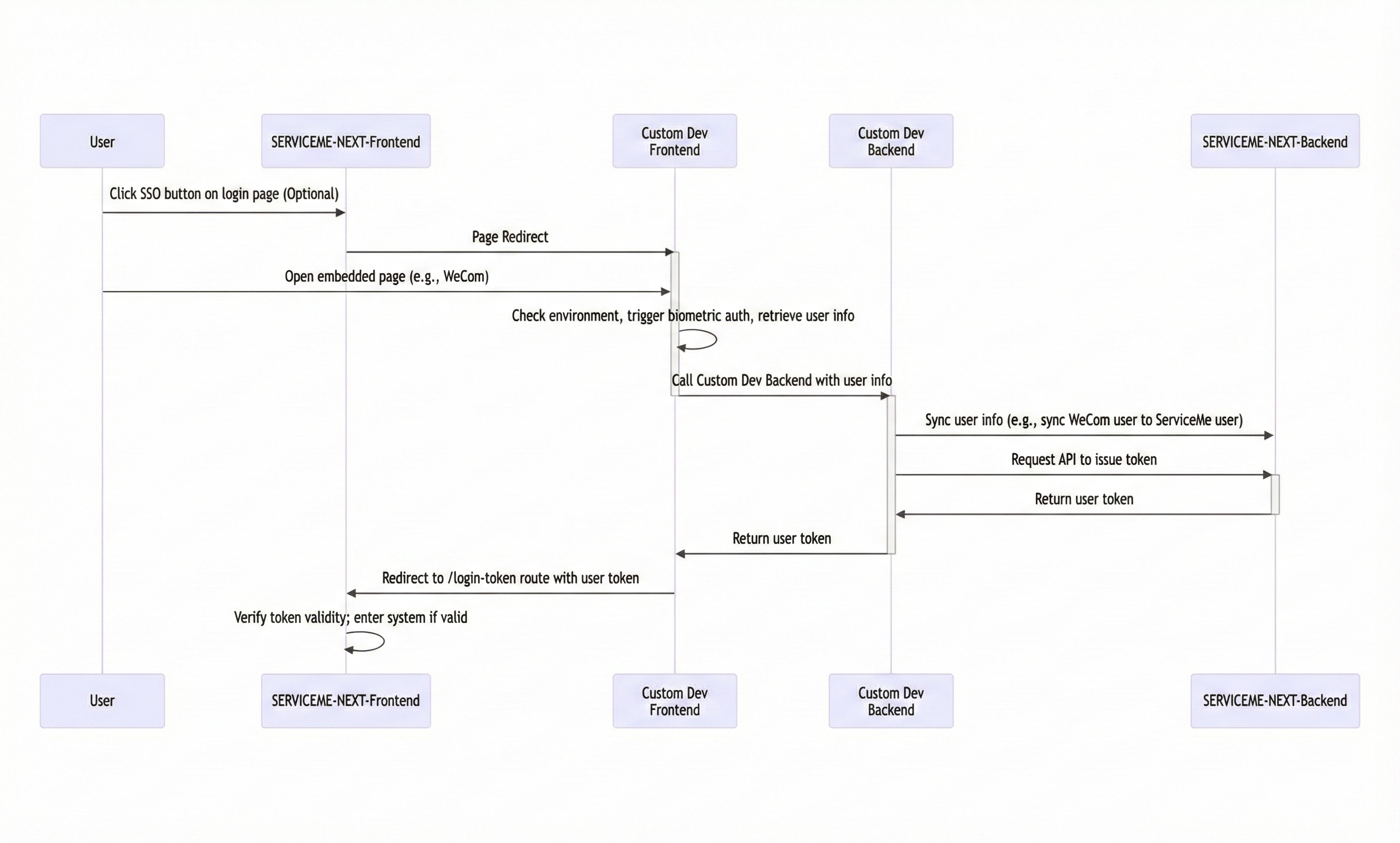
The overall service integration process is as follows:
-
Configure a login button on the SERVICEME NEXT login page (optional)
- Used to display the single sign-on entry on the product login page.
-
Redirect to a custom SSO frontend page
- Handles the login logic with the customer system (such as user information retrieval, biometric authentication initiation, etc.).
-
Access the custom SSO backend API
- Completes interaction with the SERVICEME backend, such as unified user registration and Token issuance.
-
Redirect back to the SERVICEME NEXT login page
- Return to SERVICEME NEXT with the Token to achieve automatic login.
Process diagram:
2. Detailed Instructions
2.1 Login Page Single Sign-On Button Configuration
This step is optional. If you want to provide a "Custom Login" button on the login page, you can add the configuration in the environment variables.
Go to the SERVICEME NEXT Environment Variable Management page and configure the following content in SSO_LOGIN_CONFIG:
{
  "type": "Custom",
  "code": "my-custom-sso",
  "config": {
    "LOGIN_BUTTON_I18N_KEY": "login.sso.custom.login",
    "LOGIN_URL": "/custom-login",
    "APP_ID": "BskGfSXPNt5AfQXMO6b1M"
  }
}
After the configuration is completed, a button will be displayed on the login page. Clicking it will redirect to the target link:
https://<frontend-deploy-host>/custom-login?code=my-custom-sso&APP_ID=BskGfSXPNt5AfQXMO6b1M
If you need to customize the mounted page, please refer to Product Frontend Custom Mounted Static Resource Guide - Overview.
2.2 Custom Development of the Single Sign-On Page
The page corresponding to LOGIN_URL is the customized login page, and this page needs to implement the following logic:
- Perform authentication interaction with the customer SSO system;
- Synchronize information with the custom SSO backend;
- After obtaining the Token, redirect to the SERVICEME NEXT login route.
The redirection format is as follows:
https://<frontend-deploy-host>/login-token?token=<new-jwt-token>
The SERVICEME frontend will verify the trustworthiness of the Token, and after passing verification, the user can log in to the system.
Please ensure that the JWT Token is valid and issued by a legitimate Client.
2.3 Custom Development of the SSO Backend
The custom SSO backend is mainly responsible for user Token issuance and account management.
Issuance depends on Client ID + Secret, so please create a Client in the SERVICEME backend first.
The related APIs include:
- User APIs: query, create, and update users; support searching by username, email, and employee ID;
- Third-party login APIs: manage third-party account binding;
- Client APIs: issue Tokens (ignore the trusted domain field);
- Role/Organization APIs: used for role and department synchronization.
2.4 Mount Custom Developed Frontend and Backend Services
The SERVICEME NEXT frontend image provides two mount points:
| Mount Path | Description |
|---|---|
/etc/nginx/custom_conf | Mount custom Nginx configuration |
/usr/share/nginx/static | Mount custom static resources (frontend pages) |
2.4.1 Mount a Custom Frontend Page
Place the custom HTML page in:
/usr/share/nginx/static/app2/
And add the following content in custom.conf:
location /app2 {
  root /usr/share/nginx/static/;
  index index.html index.htm index.shtml;
  try_files $uri $uri/ /index.html;

  if ($request_filename ~* .*\.html$) {
    add_header Cache-Control "no-cache, no-store";
  }
}
Mount the directory when running the container:
docker run -p 80:80 \
-v ./custom.conf:/etc/nginx/custom_conf/custom.conf \
-v ./static:/usr/share/nginx/static \
servicemerelease.azurecr.io/serviceme-frontend:4.0.0
2.4.2 Mount a Custom Backend Service
Assume the custom backend service is located at the internal network address http://delivery-backend,
and you want to access it under the frontend path /custom-backend/, you can add the following configuration in custom.conf:
location /custom-backend/ {
  proxy_pass http://delivery-backend/;
  proxy_connect_timeout 240s;
  proxy_read_timeout 240s;
  proxy_send_timeout 240s;
  proxy_buffering off;
}
Conclusion
By following the above steps, you can achieve seamless integration between SERVICEME NEXT and internal enterprise systems,
supporting single sign-on (SSO), unified user authentication, and flexible custom frontend and backend extensions.